How to Preview Your Links on Facebook, Twitter, and LinkedIn Before Publishing
You just published a blog post. You share it on Twitter... and the preview is wrong. The image is missing, the description is outdated, or the title is truncated weirdly. You delete the tweet, fix the tags, re-share... still wrong. Facebook's cache is stubborn. LinkedIn shows a different image entirely.
Social platforms cache your page's metadata aggressively. Once they fetch your Open Graph tags, they remember them-for days or weeks. Fixing tags after sharing doesn't update existing shares. Your content promotion is handicapped by bad previews you can't easily refresh.
The Social Preview Problem
When you share a URL, platforms look for specific meta tags in your HTML:
- Facebook/LinkedIn: Open Graph tags (
og:title,og:description,og:image) - Twitter/X: Twitter Card tags (
twitter:title,twitter:description,twitter:image) - WhatsApp: Open Graph tags (primarily
og:imageandog:title)
If these tags are missing, platforms guess. They might grab your logo, a random sidebar image, or your footer text as the description. The result? Unprofessional shares that get ignored.
Common failures:
- Image too small: Facebook requires 1200×630 minimum for full display
- Wrong aspect ratio: Twitter crops images differently than Facebook
- Missing tags: No description = platform scrapes random text
- Cached old version: Updated tags don't reflect in shares
- HTTPS issues: Mixed content blocks image loading
The debugging cycle is painful: share → spot problem → fix → try to clear cache → share again → maybe fixed?
The Solution: Pre-Flight Social Preview Tool
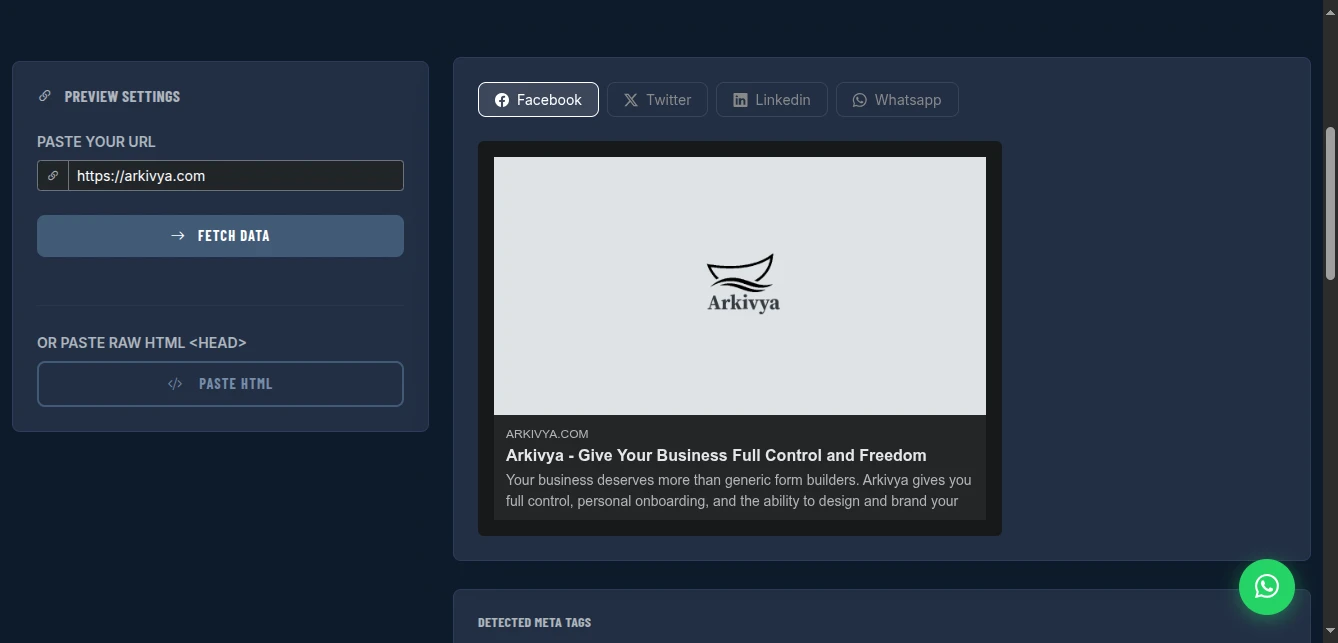
The Social Share Preview shows exactly how your page appears when shared on Facebook, Twitter/X, LinkedIn, and WhatsApp-before you publish. Test your Open Graph and Twitter Card tags, spot problems instantly, and fix them before going live.
Why This Beats Platform Debuggers
All Platforms at Once: Facebook Debugger, Twitter Card Validator, and LinkedIn Post Inspector are separate tools. This shows all four (plus WhatsApp) in one view.
No Cache Clearing Hassle: Platform debuggers often require you to "scrape again" repeatedly. This fetches fresh through a proxy, showing current state.
Tag Inspection: See all detected meta tags in a table with pass/warn/missing status. Know exactly what's present and what's absent.
Zero Friction: No Facebook login required. No Twitter developer account. No LinkedIn authentication. Just paste URL and preview.
Paste HTML Option: For pages behind login or not yet live, paste your HTML <head> directly to preview without deploying.
What Gets Previewed (And Why Each Platform Matters)
Facebook Preview
Card style: Large image with title and description below Key tags:
og:title(max 60 chars, truncated with "...")og:description(max 200 chars)og:image(1200×630 optimal, 600×315 minimum)og:url(canonical URL)
Why it matters: Facebook drives massive traffic for news, entertainment, and lifestyle content. Poor previews = lost clicks = lost revenue.
Common issues: Image too small (shows tiny thumbnail), description missing (random text appears), title truncated awkwardly.
Twitter/X Preview
Card styles:
- Summary (small square image, title, description)
- Summary Large Image (large horizontal image, title, description)
Key tags:
twitter:card(type: summary or summary_large_image)twitter:title(max 70 chars)twitter:description(max 200 chars)twitter:image(1200×600 for summary_large, 144×144 min for summary)
Why it matters: Twitter is real-time. Bad previews kill viral potential. News and commentary especially depend on Twitter traffic.
Common issues: Missing twitter:card tag (no card renders), image wrong aspect ratio (awkward crop), title too long (truncated).
LinkedIn Preview
Card style: Horizontal image with title and description to the right
Key tags: Same Open Graph as Facebook (og:*)
Image specs: 1200×627 optimal (slightly different than Facebook's 1200×630)
Why it matters: LinkedIn drives B2B traffic, professional content, and job postings. Unprofessional previews hurt credibility.
Common issues: LinkedIn caches aggressively-hardest platform to refresh. Often shows old images even after updates.
WhatsApp Preview
Card style: Small image thumbnail with title and description
Key tags: og:title, og:description, og:image
Image specs: 300×200 displays well, larger images compressed
Why it matters: WhatsApp is huge for international audiences and private sharing. Previews matter in group chats and direct messages.
Common issues: Images too large (slow to load), descriptions too long (truncated awkwardly).
How to Use It: Pre-Flight Checklist
Step 1: Enter Your URL
Paste the full URL of the page you want to test. The tool fetches it through a proxy and extracts all social meta tags.
For unpublished pages: Use the "Paste HTML" option. View source on your draft page, copy the <head> section, paste into the tool. Preview without deploying.
Step 2: Review Platform Tabs
Click through Facebook, Twitter, LinkedIn, and WhatsApp tabs. Each shows the exact card that platform will render.
Check for:
- ✅ Image appears (not broken/missing)
- ✅ Image is appropriate (not logo when you wanted featured image)
- ✅ Title is complete (not truncated mid-word)
- ✅ Description makes sense (not random footer text)
- ✅ URL is correct (not old permalink or redirect chain)
Step 3: Inspect Tag Table
Below the previews, see all detected tags with status:
- Green check: Tag present, valid content
- Yellow warning: Tag present but potential issue (image wrong size, description short)
- Red X: Tag missing or invalid
Critical tags to verify:
og:titleandtwitter:title(should match or be optimized per platform)og:descriptionandtwitter:description(compelling, accurate)og:image(1200×630, under 8MB)twitter:card(set tosummary_large_imagefor visual content)og:url(canonical, no parameters)
Step 4: Fix Issues Before Publishing
If problems detected:
Missing image: Add og:image and twitter:image tags. Use 1200×630 dimensions.
Wrong image: Specify the exact image URL in tags. Don't rely on platforms to guess.
Truncated title: Shorten to 60 chars (Facebook) or 70 chars (Twitter). Front-load important words.
Poor description: Write 150-200 char compelling summary. Include call-to-action.
No Twitter card: Add <meta name="twitter:card" content="summary_large_image">
Step 5: Re-Test After Fixes
Update your page, click "Fetch Data" again in the tool. Verify all platforms show correctly before sharing publicly.
Real-World Preview Scenarios
Blog Post Launch
Scenario: Publishing article "10 SEO Tips for 2024"
Before preview:
- Optimistic: "My theme probably handles social tags"
Tool check:
- ❌ Facebook: No image (shows default site logo)
- ❌ Twitter: No card type set (renders as basic link)
- ⚠️ LinkedIn: Description is site tagline, not article summary
- ❌ WhatsApp: Image too small (blurry thumbnail)
Fixes applied:
- Upload 1200×630 featured image
- Add
og:image,twitter:imagepointing to featured image - Set
twitter:cardtosummary_large_image - Write custom
og:descriptionsummarizing article
After preview: All platforms show compelling preview with large image, clear title, enticing description.
Result: Article shared 500+ times in first week. Previous articles (without optimization) averaged 50 shares.
Product Page Update
Scenario: Updated product photos, want to ensure social shares show new images
Before preview:
- Assumption: "New images will automatically appear"
Tool check:
- ❌ Facebook: Still showing old product image (cached)
- ❌ LinkedIn: Old image persists
- ✅ Twitter: Shows new image (different cache)
Fixes applied:
- Update
og:imageURL to include version parameter (?v=2) - Force new image filename to bypass cache
- Use Facebook Debugger and LinkedIn Post Inspector to force rescrape
After preview: All platforms show updated product photos.
Result: Social traffic conversion improved 20% with accurate product representation.
E-commerce Category Page
Scenario: Creating shareable category page for "Summer Sale"
Before preview:
- Basic page with product grid, no social optimization
Tool check:
- ❌ All platforms: No image (just site logo)
- ❌ All platforms: Description is generic "Category: Summer"
- ❌ Twitter: No card type
Fixes applied:
- Create 1200×630 hero image with "Summer Sale - Up to 50% Off"
- Add comprehensive Open Graph and Twitter Card tags
- Set
og:titleto "Summer Sale 2024 | Shop Discounts" (not just "Summer") - Write compelling description with urgency and CTA
After preview: Rich, engaging cards on all platforms.
Result: Category page shared by 15 influencers. Sale revenue 3x previous campaigns.
Pro Tips for Perfect Previews
Image Dimensions Matter:
- Facebook/LinkedIn: 1200×630 (1.91:1 ratio)
- Twitter Large: 1200×600 (2:1 ratio)
- Twitter Summary: 144×144 minimum (1:1 ratio)
- WhatsApp: 300×200 displays well
One Image, Multiple Platforms: Create 1200×630. It works acceptably everywhere, perfectly on Facebook/LinkedIn. Twitter crops slightly.
Text in Images: Keep text centered. Facebook crops 1200×630 from center. Twitter crops differently. Centered text survives both.
File Size: Keep under 8MB. Facebook rejects larger images. Compress with TinyPNG if needed.
HTTPS Required: Mixed content (HTTP image on HTTPS page) gets blocked. Ensure og:image URL is HTTPS.
Cache Busting: When updating images, change the filename or add query parameter (?v=2). Forces platforms to fetch fresh.
Platform-Specific Optimization: Twitter allows different title/description than Facebook. Optimize for each platform's audience if significant traffic expected.
Comparison with Platform Tools
| Feature | Facebook Debugger | Twitter Validator | LinkedIn Inspector | This Tool |
|---|---|---|---|---|
| Facebook Preview | Yes | No | No | Yes |
| Twitter Preview | No | Yes | No | Yes |
| LinkedIn Preview | No | No | Yes | Yes |
| WhatsApp Preview | No | No | No | Yes |
| All in One View | No | No | No | Yes |
| Tag Inspection | Limited | Limited | Limited | Yes |
| No Login Required | No (FB login) | Yes | Yes (sometimes) | Yes |
| Paste HTML Option | No | No | No | Yes |
| Cache Refresh | Yes | Yes | Yes | N/A (fresh fetch) |
Limitations and Workarounds
No Cache Refresh: Unlike platform debuggers, this doesn't clear platform caches. Workaround: Use this for pre-flight checks. If already shared with wrong preview, use official debuggers to force rescrape.
JavaScript-Rendered Pages: SPAs may not have meta tags in initial HTML. Workaround: Use server-side rendering for social tags, or dynamic rendering services.
CORS/Blocking: Some sites block the fetching proxy. Workaround: Use "Paste HTML" option with view-source content.
Image Size Detection: Tool checks image URL presence, not actual dimensions. Workaround: Manually verify image is 1200×630 in image editor.
Conclusion
Stop discovering broken social previews after you've already shared. Stop the painful cycle of share-delete-fix-reshare. Stop losing traffic to bad first impressions.
The Social Share Preview tool gives you complete visibility into how your content appears across all major platforms-before you publish. Fix Open Graph tags, optimize images, and perfect your descriptions in private, not in production.
Your social shares are your content's packaging. Make them compelling.
Preview your social shares now - no signup required.