How to Convert Text to Speech for Free Without API Limits
You need a voiceover for a video. Maybe it's a YouTube narration, an e-learning module, or accessibility audio for visually impaired users. Your options? Hire a voice actor ($100+ per hour), use AI voice services (ElevenLabs, Murf, Play.ht-all have strict usage limits and subscriptions), or settle for robotic system voices that sound amateur.
The AI voice services are impressive but expensive. ElevenLabs' free tier is 10,000 characters/month-about 10 minutes of audio. Murf starts at $19/month. And they all require accounts, API keys, and have usage anxiety ("will I hit my limit mid-project?").
The TTS Problem
Text-to-speech needs vary widely:
- Content creators: YouTube narration, TikTok voiceovers, podcast intros
- Educators: E-learning modules, course materials, accessibility compliance
- Developers: App voice prompts, IVR systems, notification audio
- Accessibility: Screen reader alternatives, document reading, visual impairment support
- Marketers: Video ads, product explainers, presentation narration
But the solutions are either:
- Expensive: Professional AI voices with monthly subscriptions
- Limited: Free tiers with character caps that block mid-project
- Robotic: System TTS that sounds like 2005 GPS navigation
- Complex: Self-hosted solutions requiring technical setup
The Solution: Unlimited Browser-Based TTS
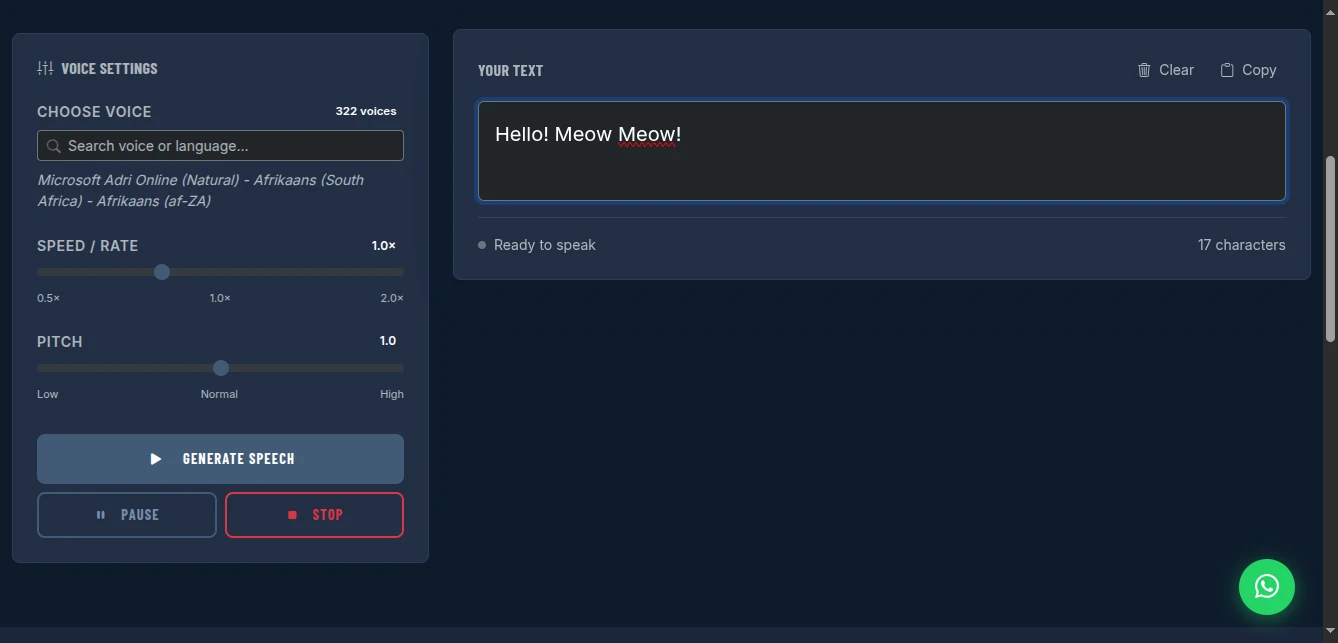
The Text to Speech tool provides free, unlimited voice generation using your browser's built-in Web Speech API. 322+ voices across languages and accents. Speed and pitch control. No API keys. No quotas. No accounts. Completely private.
Why This Approach Works
Truly Unlimited: No character limits. No monthly caps. Generate 10 seconds or 10 hours of audio. The only limit is your device's processing power.
Zero Cost: ElevenLabs charges $5/month for 30K characters. Murf starts at $19/month. This uses your browser's built-in capability-completely free.
No Registration: No email to verify. No password to forget. No account to get locked out of. Open the page and start generating.
Privacy Protected: Your text is processed entirely on your device by the browser's speech engine. No data sent to servers. No voice samples stored. No training data collection.
322+ Voices: Access all voices installed on your system-Windows, macOS, Android, iOS each provide dozens of voices in multiple languages.
Fine Control: Adjust speed (0.5× to 2×) and pitch (low to high) for perfect delivery.
Understanding the Web Speech API
This tool leverages the Web Speech API, a browser standard supported by Chrome, Edge, Safari, and Firefox. Here's how it works:
Browser-Integrated: Your operating system provides voices (Microsoft, Apple, Google voices). The browser exposes them to web pages. This tool provides the interface.
Local Processing: Text → Browser speech engine → Audio output. No cloud servers. No internet required after page load.
Voice Variety: Depends on your OS:
- Windows: Microsoft voices (David, Zira, Mark, etc.)
- macOS/iOS: Apple voices (Samantha, Alex, Victoria, etc.)
- Android: Google voices (varies by device)
- Linux: Festival, eSpeak voices
Quality Spectrum: From robotic system voices to natural-sounding neural voices (on newer OS versions).
How to Use It: Complete Workflow
Step 1: Input Your Text
Type or paste content into the text area. Supports:
- Long-form articles (paste full blog posts)
- Scripts with paragraphs (natural pauses at line breaks)
- SSML tags (limited support depending on browser)
Character guidance: While unlimited, very long texts (10,000+ words) may perform better split into sections.
Step 2: Select Your Voice
Use the search box to filter 322+ voices:
- By name: "David", "Samantha", "Google"
- By language: "English", "Spanish", "French"
- By accent: "US", "UK", "Australian"
Voice selection tips:
- Narration: Natural, neutral voices (David, Samantha)
- Energetic content: Higher pitch, faster rate
- Serious content: Lower pitch, slower rate
- Character voices: Experiment with pitch adjustments
Step 3: Adjust Speed and Pitch
Speed/Rate: 0.5× (slow) to 2.0× (fast)
- 0.8×: Deliberate, clear for learning content
- 1.0×: Natural conversation speed
- 1.3×: Energetic, good for ads
- 1.5×+: Fast, for quick updates
Pitch: Low to High
- Low: Authoritative, serious, mature
- Normal: Balanced, natural
- High: Energetic, youthful, urgent
Step 4: Generate and Listen
Click "Generate Speech." The browser processes the text and plays audio.
Controls:
- Pause: Temporarily stop playback
- Stop: End playback completely
- Regenerate: Adjust settings and try again
Step 5: Save Audio (Workaround)
The Web Speech API doesn't expose direct audio file download. To save:
Option A: Screen Recording
- Use OBS, QuickTime, or screen recorder
- Record while playing generated speech
- Extract audio in editing software
Option B: Audio Routing
- Windows: Use "Stereo Mix" or VB-Cable to capture system audio
- macOS: Use BlackHole or similar audio loopback
- Route browser audio to recording software
Option C: Browser Extensions
- Some extensions can capture tab audio
- "Chrome Audio Capture" or similar
Note: This limitation is browser API restriction, not the tool. Direct download would require server-side processing, compromising privacy.
Real-World Use Cases
YouTube Content Creator
Scenario: Narrating explainer videos without showing face
Workflow:
- Write script in Google Docs
- Paste into TTS tool
- Select natural voice (Microsoft David or Google US English)
- Set speed to 1.1× (slightly faster than natural, maintains engagement)
- Generate, screen record audio
- Sync with video in editing software
Result: Professional narration without microphone investment or vocal strain. 50+ videos created.
E-Learning Developer
Scenario: Adding voiceover to online course modules
Workflow:
- Break course content into 5-minute sections
- Paste each section into tool
- Select clear, authoritative voice
- Set speed to 0.9× (slower for learning comprehension)
- Generate audio for each section
- Sync with slide changes in Articulate/Captivate
Result: Consistent narration across 20+ course modules. Students appreciate clear audio. Accessibility compliant.
Accessibility Advocate
Scenario: Creating audio versions of blog posts for visually impaired readers
Workflow:
- Copy blog post HTML
- Strip to plain text
- Paste into TTS tool
- Select natural reading voice
- Generate and record audio
- Upload as podcast episode or audio player embed
Result: Blog content accessible to screen reader users and auditory learners. Expanded audience reach.
App Developer
Scenario: Need voice prompts for app onboarding
Workflow:
- Write onboarding script ("Welcome to AppName. Let's get you set up.")
- Generate with friendly, welcoming voice
- Record audio via screen capture
- Convert to MP3/WAV
- Integrate into app audio assets
Result: Professional voice prompts without hiring voice actor. Updated easily when copy changes.
Language Learner
Scenario: Practicing pronunciation and listening comprehension
Workflow:
- Paste foreign language text
- Select native speaker voice for that language
- Adjust speed to 0.7× for clarity
- Listen repeatedly, practice pronunciation
- Increase speed gradually as comprehension improves
Result: Free access to native speaker audio for 50+ languages. Improved listening skills.
Pro Tips for Best Results
Voice Selection: Test multiple voices with your content type. Some voices handle technical terms better. Others excel at conversational text.
Punctuation Matters: The engine pauses at periods, commas, and line breaks. Use punctuation strategically for natural rhythm.
Chunk Long Content: Split 5,000+ word articles into sections. Generate separately for better performance and easier editing.
Speed Testing: 1.0× is baseline. 1.2× often feels more engaging without sounding rushed. 0.8× improves clarity for complex content.
Pitch Adjustment: +0.5 pitch adds energy. -0.5 pitch adds authority. Extreme adjustments sound unnatural.
Preview First: Generate first paragraph, adjust settings, then do full content. Saves time on revisions.
Comparison with AI Voice Services
| Feature | ElevenLabs | Murf | Play.ht | This Tool |
|---|---|---|---|---|
| Cost | $5-330/mo | $19-99/mo | $14-39/mo | Free |
| Character Limit | 10K-2M/mo | Unlimited | Unlimited | Unlimited |
| Voice Quality | Excellent | Good | Good | Varies (OS dependent) |
| Voice Cloning | Yes | No | Yes | No |
| API Required | Yes | Yes | Yes | No |
| Privacy | Cloud | Cloud | Cloud | Local |
| Account Required | Yes | Yes | Yes | No |
| Languages | 29 | 20 | 140+ | OS dependent (50+) |
| Download Audio | Yes | Yes | Yes | Via recording |
Limitations and Workarounds
No Direct Download: Browser API doesn't expose audio file. Workaround: Screen record, audio routing, or browser extensions as described above.
Voice Quality Varies: Depends on OS voices. Windows 11 and macOS have better neural voices than older systems. Workaround: Update OS for best voice quality, or accept robotic voices for utility use.
No Voice Cloning: Can't replicate specific voices. Workaround: For brand consistency, select one voice and use consistently across all content.
No SSML Full Support: Some advanced speech markup may not work. Workaround: Use plain text with strategic punctuation for natural pauses.
Browser Dependency: Voices available depend on browser and OS. Workaround: Chrome typically has best support. Test in your target browser.
When to Upgrade to Paid AI Voices
This free tool handles:
- Explainer videos
- E-learning content
- Accessibility audio
- App prompts
- Personal projects
Consider ElevenLabs/Murf when you need:
- Voice cloning (replicate specific person's voice)
- Emotional range (whispering, shouting, emotional delivery)
- Commercial rights (some free TTS voices have usage restrictions)
- Consistent quality (guaranteed high quality regardless of OS)
- Direct download (no recording workarounds)
For many use cases-especially content creation, education, and accessibility-this free tool delivers professional results without cost or complexity.
Conclusion
Stop paying $20+/month for voiceover quotas. Stop hitting API limits mid-project. Stop worrying about voice data privacy.
The Text to Speech tool gives you unlimited, private voice generation using your browser's built-in capabilities. 322+ voices, fine speed/pitch control, completely free.
Your content deserves voice. Give it voice without giving away your budget or your data.
Generate speech now - no signup required.