How to Create Realistic X (Twitter) Post Mockups for Marketing
You need to show a tweet in a client presentation. Maybe it's a mockup of a viral campaign concept, a screenshot of customer praise, or a content calendar preview. You could screenshot an actual tweet, but that's time-consuming, might show sensitive info, and looks unprofessional if the UI changes.
Designing one from scratch in Photoshop? You need the exact dark mode colors, the proper typography, the verification badge variations (Blue, Gold, Grey), and the engagement metric formatting (1.2K, 3.5M). One small detail wrong and the mockup looks fake.
Mobile apps that generate fake tweets? They're covered in ads, add watermarks, or have limited customization. And they don't export at presentation quality.
The Tweet Mockup Problem
X (Twitter) mockups serve critical business functions:
- Client presentations: Showing social media concepts to stakeholders
- Content planning: Visualizing posts before scheduling
- Marketing decks: Including social proof or campaign examples
- Training materials: Teaching social media management
- App store screenshots: Showing Twitter integration
- Viral concept testing: Mocking up viral tweet formats
But authenticity matters. Viewers spot fake mockups instantly-the wrong shade of dark mode, misaligned elements, incorrect font weights, or engagement numbers that don't format properly (showing "1500" instead of "1.5K").
The Solution: Professional X Mockup Studio
The X/Tweet Mockup Generator creates pixel-perfect X (Twitter) post mockups with authentic dark mode aesthetics, verification badges (Blue/Gold/Grey), engagement metrics, and media support. Perfect for marketing, presentations, and content planning-completely free and private.
Why This Beats Screenshotting or Design Software
Pixel-Perfect Accuracy: Uses exact X color palette, Inter font family, spacing, and sizing. Indistinguishable from real tweets to the average viewer.
Verification Badge Options: Blue (personal/verified), Gold (organizations), Grey (government). Match the account type you're mocking up.
Engagement Formatting: Automatic number formatting (342 → 342, 1,500 → 1.5K, 3,500,000 → 3.5M). Looks authentic at any scale.
Media Support: Single images, 2-4 photo grids, or polls. Match real X post formats exactly.
No Watermarks: Clean, unbranded output suitable for client presentations. No "Generated by FakeTweet" badges.
Privacy Protected: Your mockup content never leaves your browser. Create sensitive mockups (client concepts, internal scenarios) securely.
GitHub Pages Deployment: Get a shareable link to your mockup with one-click deployment to free hosting.
Key Features for Professional Mockups
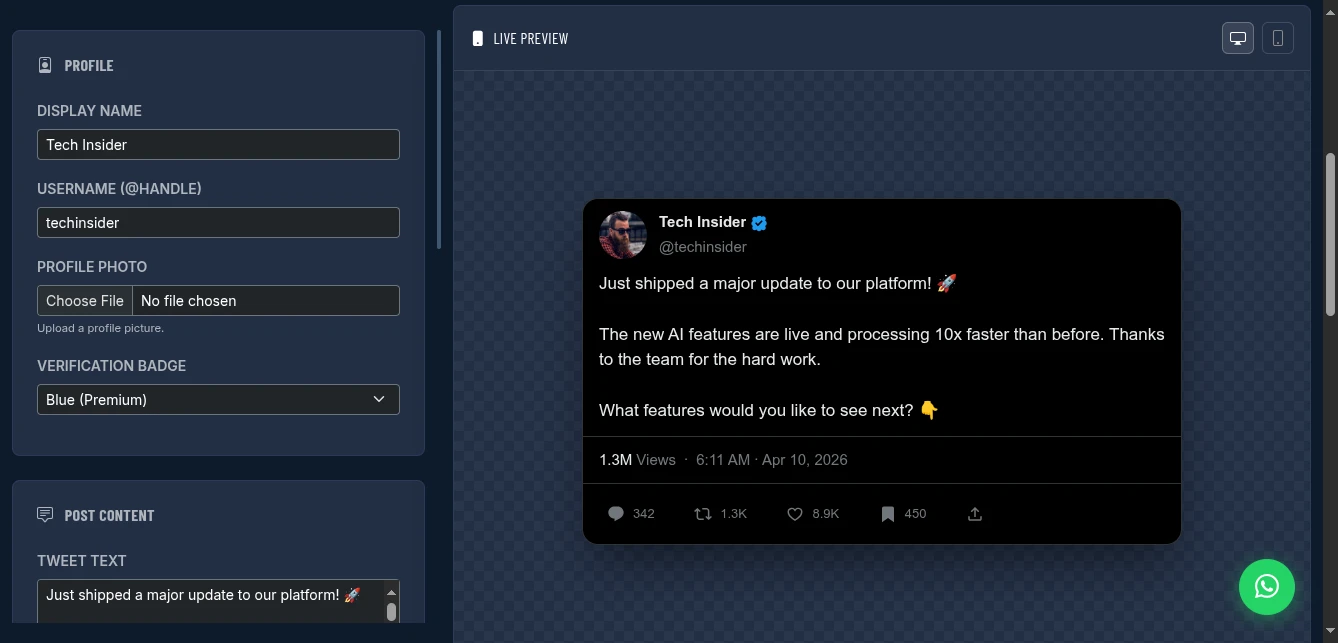
Profile Configuration
- Display Name: Full name shown in bold
- Username: @handle with verification badge option
- Profile Photo: Upload any image
- Verification: Blue (verified), Gold (org), Grey (gov), or none
- Timestamp: Custom date/time for scenario realism
Post Content
- Tweet Text: Full support for mentions, hashtags, URLs
- Views: Set view count (displays as 1.3M, 450K, etc.)
- Media Attachments:
- Single image
- 2-image grid
- 3-image grid
- 4-image grid
- Poll with options and vote counts
Engagement Metrics
Customize all interaction numbers:
- Replies: Comment count
- Reposts: Retweet count
- Likes: Heart count
- Bookmarks: Save count
All format automatically (342, 1.5K, 3.5M, 1.2B).
Authentic Styling
Dark Mode: True X dark mode colors (#000000 background, #e7e9ea text, #1d9bf0 links) Typography: Inter font, proper weights and sizes Layout: Exact spacing, padding, and borders Icons: Accurate reply, repost, like, share, bookmark icons Thread Lines: Visual indicators for reply chains
How to Use It: Step-by-Step
Step 1: Set Up Profile
Configure the account identity:
- Display Name: "Tech Insider" or "Customer Support" or "Your Brand"
- Username: @techinsider, @helpdesk, @yourbrand
- Profile Photo: Upload logo or representative image
- Verification: Select badge type that matches the account
Pro tip: For client presentations, use their actual profile photo and verification status for realism.
Step 2: Compose the Tweet
Write your mockup content:
- Text: The tweet message (supports mentions @user, hashtags #topic)
- Views: Set a realistic view count for the scenario
- Timestamp: Match your narrative (e.g., "2h" for recent, "Apr 9" for older)
Character guidance: 280 characters max (X limit). Longer text truncates with "..." in preview.
Step 3: Add Media (Optional)
Choose media type:
- No Media: Text-only tweet
- Single Image: One photo attachment
- 2-Image Grid: Side by side photos
- 3-Image Grid: One large left, two stacked right
- 4-Image Grid: 2×2 grid
- Poll: Question with 2-4 options and vote counts
Upload images for photo grids. The tool handles X's specific crop ratios automatically.
Step 4: Set Engagement Numbers
Enter counts for:
- Replies (e.g., 342)
- Reposts (e.g., 1500 → displays as 1.5K)
- Likes (e.g., 8900 → displays as 8.9K)
- Bookmarks (e.g., 450)
Realism tip: Match ratios to real viral tweets. High replies + high reposts + moderate likes = controversial. High likes + low reposts = popular but not viral.
Step 5: Preview and Export
The live preview updates instantly. Check for:
- Text formatting (mentions highlighted, hashtags linked)
- Image grid layout
- Engagement number formatting
- Overall visual authenticity
Export options:
- PNG Screenshot: High-resolution static image
- HTML File: Self-contained interactive version
- GitHub Pages: Deploy for shareable URL
Deploying to GitHub Pages: Shareable Mockups
Get a permanent URL for your mockup in 4 steps:
- Create GitHub repository at github.com/new (set to Public)
- Generate Personal Access Token with
reposcope - Enable GitHub Pages (Settings → Pages → Deploy from branch → main)
- Deploy: Enter token and repo in the tool, click Deploy
Your mockup lives at: https://yourusername.github.io/your-repo/
Share this in:
- Slack/Teams for team feedback
- Email to clients
- Presentation decks as live examples
- Documentation as scenario illustrations
Real-World Use Cases
Client Pitch Deck
Scenario: Pitching social media campaign to SaaS client
Mockup created:
- Profile: Client's brand (@clientapp, Gold verification)
- Tweet: "Just launched our biggest update yet 🚀" with product screenshot
- Engagement: 5.2K likes, 1.2K reposts, 890 replies (aspirational but realistic)
- Media: 4-image grid showing product features
Use: Slide in deck showing "Example viral campaign execution"
Result: Client commented on how realistic the mockup looked. Won the pitch.
Content Calendar Preview
Scenario: Social media manager planning Q2 content
Mockups created: 12 tweets representing monthly themes
- Product announcements
- User-generated content features
- Industry commentary
- Polls for engagement
Use: Shared GitHub Pages links with marketing team for approval before scheduling
Result: Team provided feedback on copy and visuals before any real posts. Reduced revision cycles by 60%.
App Store Screenshots
Scenario: Twitter client app needs store screenshots
Mockups created: Various tweet scenarios showing app features
- Thread reading
- Media viewing
- Poll participation
- Dark mode interface
Use: Screenshots in App Store and Play Store listings
Result: Clean, controlled scenarios without relying on real tweets that might change or be deleted.
Training Materials
Scenario: Onboarding new social media team members
Mockups created: Examples of different tweet types
- Good vs. bad engagement ratios
- Effective vs. ineffective copy
- Proper hashtag usage
- Media optimization examples
Use: Training deck with side-by-side comparisons
Result: New team members understood platform nuances faster with clear visual examples.
Pro Tips for Authentic Mockups
Verification Badges: Use the right color:
- Blue: Individual verified accounts (most common)
- Gold: Organizations, brands, companies
- Grey: Government entities, multilateral organizations
Engagement Realism: Viral tweets typically have:
- Likes: 10-50× reposts
- Reposts: 2-5× replies
- Views: 100-1000× likes
Timestamp Strategy:
- Use "2h" or "5h" for fresh, urgent content
- Use "Apr 9" for established, proven content
- Match to your narrative timeline
View Counts: X shows views on all tweets now. Include realistic view counts (typically 10-100× engagement total).
Media Quality: Use high-resolution images. X compresses, but starting quality matters for mockup realism.
Dark Mode Consistency: X defaults to dark mode for many users. The tool uses authentic dark mode colors.
Comparison with Alternatives
| Feature | Photoshop | Mobile Apps | Screenshot Real Tweet | This Tool |
|---|---|---|---|---|
| Cost | $20+/mo | Freemium | Free | Free |
| Time to Create | 30+ min | 5-10 min | 10 min (finding) | 2 min |
| Accuracy | Depends on skill | Often wrong | Perfect | Pixel-perfect |
| Watermark | No | Usually yes | No | No |
| Media Support | Manual | Limited | Real only | Full support |
| Engagement Edit | Manual | Limited | No | Full control |
| Privacy | Local | Cloud | N/A | Browser-only |
| Export Quality | High | Low | Screen res | High |
Limitations and Workarounds
No Thread Mockups: Can't mockup full tweet threads (replies to self). Workaround: Create individual mockups for key tweets in thread, present as sequence.
No Quote Tweets: Can't show "Quote Tweet" format. Workaround: Create standard tweet mentioning "Quoting @user" in text.
No Reply Context: Doesn't show "Replying to @user" header. Workaround: Standard tweet format works for most use cases. Note in presentation if reply context needed.
Static Only: No animation/video support. Workaround: For video tweets, use first frame as static image, note "[VIDEO]" in presentation.
Conclusion
Stop wrestling with Photoshop layers. Stop screenshotting random tweets and hoping no one notices. Stop paying for mobile apps that watermark your work.
The X/Tweet Mockup Generator gives you professional, pixel-perfect tweet mockups in minutes. Perfect for presentations, planning, and prototyping-completely free with complete privacy.
Your social media concepts deserve professional presentation. Give them the mockup quality that wins pitches and communicates clearly.
Create your first X mockup now - no signup required.