How to Create a Digital Business Card with QR Code
You're at a networking event. Someone asks for your card. You reach into your pocket... and you're out. Or the cards you have show your old job title. Or they're wrinkled from sitting in your wallet. Physical business cards are expensive to print, impossible to update, and often end up in the trash.
Digital alternatives exist-LinkedIn, email signatures, contact apps-but they're fragmented. You need something that works instantly: a QR code they can scan, a vCard they can save, and a beautiful page they can bookmark. All without downloading yet another app.
The Business Card Problem
Traditional business cards have real issues:
- Cost: $50-200 for quality printing, reprint when info changes
- Static: New phone number? New job? Old cards become trash.
- Limited: Only name, title, phone, email. No links to portfolio, social, or latest work.
- Environmental: Billions printed yearly, most discarded within a week.
- No analytics: Did they call? Visit your site? You'll never know.
Digital solutions are incomplete:
- LinkedIn: Requires app, not everyone uses it, doesn't include all contact info
- Email signatures: Only work after first contact
- Contact apps: Require both parties to have the same app
- QR codes alone: Just a link, no saveable contact info
The Solution: Complete Digital Contact System
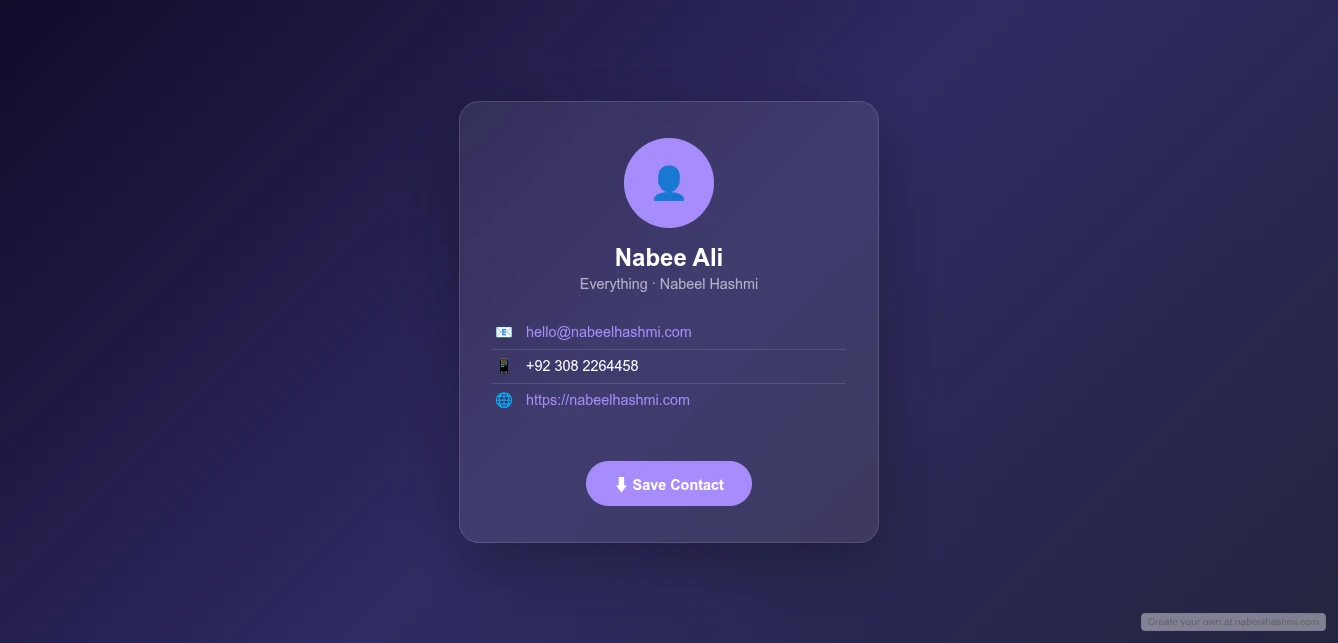
The Contact Card (vCard) Maker creates a professional digital business card with three components:
- Beautiful contact page with your photo, details, and links
- Scannable QR code that opens your contact page
- vCard (.vcf) download that imports directly into phone contacts
Deploy to GitHub Pages for a free, permanent link: yourname.github.io/contact
Why This Beats Paper Cards
Always Current: Update your info anytime, the QR code and link stay the same. No reprinting. No outdated cards.
Comprehensive: Include everything-phone, email, address, website, LinkedIn, Twitter, bio, photo. Not cramped onto a 3.5" card.
Instant Save: The vCard downloads as .vcf file. One tap imports to their phone contacts. No manual typing errors.
Free Hosting: GitHub Pages hosting costs $0 forever. No domain fees. No hosting subscriptions.
Professional Presentation: Clean, modern design that impresses. Not a crumpled piece of cardstock.
Analytics Ready: Use UTM parameters or link shorteners to track visits to your contact page.
Key Features for Professional Networking
Complete Contact Information
- Name: First and last
- Title/Position: Your role
- Organization: Company or freelance brand
- Email: Professional address
- Phone: Mobile and work numbers
- Website: Personal site or portfolio
- LinkedIn: Profile URL
- Address: Physical location (optional)
- Bio/Note: Professional summary or tagline
Visual Identity
- Profile Photo: Upload professional headshot
- QR Code: Auto-generated, scannable vCard QR
- Clean Design: Modern card layout
- Mobile Optimized: Perfect display on phones
Multiple Export Options
- vCard (.vcf): Standard contact file format
- QR Code Image: Save and print on anything
- Contact Page: Shareable URL with all info
- GitHub Pages: Permanent hosted version
How to Use It: Build Your Digital Card
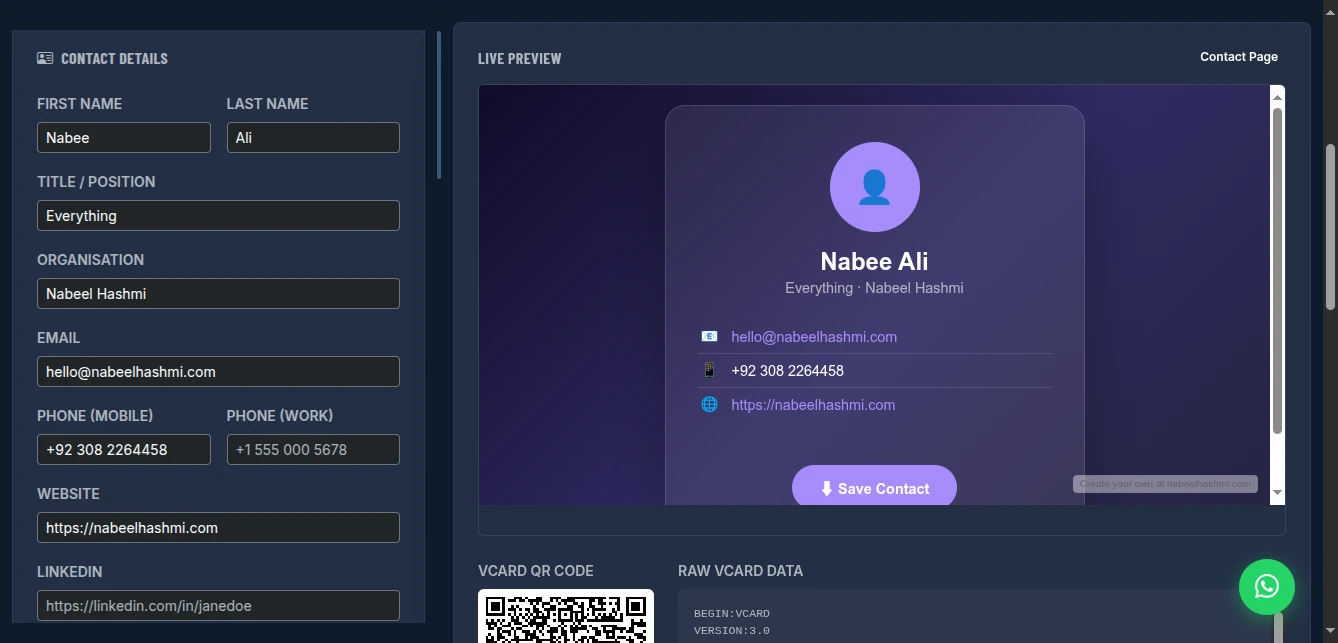
Step 1: Enter Contact Details
Fill in the form:
- First/Last Name: As you want it saved in contacts
- Title: "Senior Developer", "Marketing Director", "Freelance Designer"
- Organization: Company name or "Independent"
- Email: Professional email (not the old Yahoo address)
- Phone: Include country code (+1 for US, +44 for UK, etc.)
- Website: Portfolio, LinkedIn, or company site
- LinkedIn: Full profile URL
- Address: Optional, but helpful for local networking
- Bio: Short professional summary ("Full-stack developer specializing in React and Node.js")
Pro tip: Use the email and phone you actually want people to use. This is your professional identity.
Step 2: Upload Profile Photo
Choose a professional headshot:
- Square aspect ratio works best
- Clear, well-lit face
- Professional attire matching your industry
- Neutral or branded background
The photo appears on your contact page and in the vCard preview.
Step 3: Preview Your Card
The live preview shows:
- Your photo and name prominently
- All contact details organized
- "Save Contact" button for vCard download
- QR code for instant mobile access
Check that all information displays correctly and looks professional.
Step 4: Export and Share
Option A: Download vCard
- Click to download .vcf file
- Attach to emails: "Here's my contact info"
- Store on phone for sharing via AirDrop/Bluetooth
Option B: Save QR Code
- Right-click QR code image
- Save as PNG
- Add to:
- Email signature
- Physical business card (hybrid approach)
- Presentation slides
- Resume/CV
- Conference badge
Option C: Deploy to GitHub Pages (Recommended) Get a permanent, shareable URL:
-
Create GitHub repository at github.com/new
- Name it
contactorvcard - Set to Public (required for free Pages)
- Name it
-
Generate Personal Access Token
- GitHub Settings → Developer settings
- Classic token: tick
reposcope - Or fine-grained: Contents permission "Read and write"
-
Enable GitHub Pages
- Repo Settings → Pages
- Source: Deploy from a branch
- Branch:
main, folder:/ (root) - Save
-
Deploy from Tool
- In Contact Card Maker, expand GitHub Deploy panel
- Paste your token
- Repository:
username/contact - Click "Deploy to GitHub Pages"
Your contact page is now live at: https://yourusername.github.io/contact/
Real-World Networking Scenarios
Conference Networking
Scenario: Meeting dozens of people at industry conference
Setup:
- QR code on phone lock screen wallpaper
- Contact page URL in email signature
- vCard ready to AirDrop
Interaction:
- Meet someone interesting
- Show QR code: "Scan this to save my contact"
- They scan, see your professional page, save vCard
- No paper cards exchanged, no typing errors
Result: 50+ contacts made, all with accurate info saved directly to their phones. Follow-up emails sent next day with 100% deliverability.
Job Seeking
Scenario: Networking while job hunting
Setup:
- Contact card includes LinkedIn and portfolio
- Bio mentions "Open to new opportunities"
- GitHub Pages URL on resume header
Interaction:
- Recruiters scan QR at job fair
- Instant access to complete profile
- Save contact for future roles
- Portfolio one tap away
Result: Recruiters commented on professionalism. Callback rate improved vs. paper resume alone.
Freelancer Client Acquisition
Scenario: Meeting potential clients at co-working space
Setup:
- Contact card shows portfolio link prominently
- Bio specifies services offered
- QR on laptop sticker for casual scanning
Interaction:
- Casual conversation turns to business needs
- "Let me give you my info" → show QR
- Client saves contact, browses portfolio later
- Professional impression vs. scribbled phone number
Result: 3 clients acquired from co-working networking. All mentioned the professional contact method.
Hybrid Approach (Paper + Digital)
Scenario: Still want physical cards for traditional settings
Setup:
- Minimal paper card: Name + QR code only
- QR links to full digital card
- No phone/email on paper (stays current)
Interaction:
- Exchange paper card as tradition
- They scan QR for complete, current info
- Paper card becomes gateway, not limitation
Result: Best of both worlds. Traditional gesture, modern functionality. Cards never outdated.
Pro Tips for Maximum Impact
Photo Quality: Professional headshot, not casual selfie. First impression matters.
Bio Strategy: Include what you do and who you help. "Web developer" is weak. "I help SaaS companies convert visitors into customers" is strong.
Link Priority: Put your most important link first (portfolio for creatives, LinkedIn for corporate, website for business owners).
QR Placement:
- Phone wallpaper (always ready)
- Email signature (every email shares it)
- Physical card (hybrid approach)
- Presentation last slide ("Connect with me")
GitHub URL: Short and professional. github.io/contact is cleaner than linkedin.com/in/long-name-12345.
Update Regularly: New role? New portfolio piece? Update immediately. Digital cards stay fresh.
Track Interest: Use URL shortener (bit.ly) or UTM parameters to see how many people visit your contact page.
Comparison with Alternatives
| Feature | Paper Cards | Contact Apps | This Tool | |
|---|---|---|---|---|
| Cost | $50-200/reprint | Free | Freemium | Free |
| Updateable | No | Yes | Yes | Yes |
| Always Current | No | Yes | Yes | Yes |
| vCard Download | No | Limited | Varies | Yes |
| QR Code | Add-on | No | Varies | Yes |
| Custom Page | No | Limited | Limited | Yes |
| No App Required | Yes | No | No | Yes |
| Analytics | No | Yes | Varies | Via UTM |
| Environmental | Wasteful | Digital | Digital | Digital |
Deploying to GitHub Pages: Why It Matters
Free Forever: GitHub Pages costs $0. No "introductory rate" that increases. No hidden fees.
Professional Domain: yourname.github.io is recognized and trusted. Better than random shortener domains.
Your Control: Update anytime. No platform changes terms. No service shuts down.
SSL Included: HTTPS automatically. Secure, professional.
Fast Loading: GitHub's CDN serves your contact page globally in milliseconds.
No Branding: Unlike Linktree or similar, no "Powered by" badges. Just your content.
Limitations and Workarounds
No Built-in Analytics: GitHub Pages doesn't track visits. Workaround: Use bit.ly or similar to shorten your URL, get click analytics. Or add Google Analytics 4 code if technical.
No Custom Domain on Free Tier: Uses github.io subdomain. Workaround: Upgrade to custom domain anytime by configuring DNS with your domain provider. Still hosted free.
No Editing After vCard Download: Once someone saves your .vcf, they have that version. Workaround: They can re-scan QR or revisit URL for updated info. Or you can version your vCard (v2, v3) for major changes.
Photo Storage: Photo embedded in generated files. Workaround: Use reasonably sized photo (under 500KB) for fast loading.
Conclusion
Stop running out of business cards. Stop handing out outdated information. Stop watching your cards hit the trash.
The Contact Card Maker gives you a complete digital networking solution-beautiful contact page, scannable QR code, savable vCard, and free permanent hosting. Professional, current, environmentally friendly.
Your network is your net worth. Manage it with tools that match your professionalism.
Create your digital business card now - no signup required.