How to Choose a Linux Distro (And Why Kubuntu Should Win)
One of the most common questions new Linux users face isn't about commands or configurations - it's the very first one: which Linux should I use?
The question is legitimate. There are hundreds of Linux distributions, each with its own defaults, package manager, release cycle, and intended audience. Walking into the Linux world without guidance is like walking into a library where all the signs are in a language you don't speak yet.
This guide cuts through the noise. We'll look at the most significant distributions, explain who they're for, and make the case for why Kubuntu is the right starting point for most people.
What Is a Linux Distribution?
A Linux "distro" is a complete operating system built around the Linux kernel. The kernel is the core - the part that actually talks to your hardware. But the kernel alone doesn't give you a usable computer. A distribution bundles the kernel with a package manager, a desktop environment, default applications, an installer, and a support ecosystem.
Different distributions make different choices about all of these things. That's why they're different, and that's why there are so many of them.
The Major Players
Ubuntu
Ubuntu is the most widely used Linux distribution in the world, maintained by a company called Canonical. It was designed from the beginning to be accessible, and for many years it was the recommendation for Linux beginners.
Ubuntu's strength is its ecosystem. Because it's so popular, nearly every Linux tutorial, software package, and support forum targets Ubuntu. When something works on Ubuntu, it usually works on anything based on Ubuntu - and a huge number of distros are.
Ubuntu uses GNOME as its default desktop, which has its own trade-offs (see our desktop environments article). The Ubuntu-specific customizations to GNOME are tasteful but still inherit GNOME's limitations around customization and its learning curve for Windows users.
Ubuntu releases a new version every six months, with Long Term Support (LTS) versions every two years. The LTS versions receive five years of security updates, making them excellent for stability.

Best for: Server use, developers who want a stable and well-documented platform.
Fedora
Fedora is sponsored by Red Hat and tends to ship the very latest versions of software. It's often described as a "bleeding edge" distribution - you get new features quickly, but occasionally at the cost of stability.
Fedora also uses GNOME by default, and it provides perhaps the cleanest GNOME experience available - no extra customization, just upstream GNOME. For GNOME enthusiasts, this is ideal. For everyone else, it's not a selling point.
Fedora uses the dnf package manager and the RPM package format rather than Ubuntu's apt and .deb. This means some of the Ubuntu-centric documentation you'll find online won't translate directly to Fedora without adjustment.
Best for: Developers who want the latest software, GNOME enthusiasts, users interested in Red Hat's ecosystem.
Arch Linux
Arch is the Linux distribution that has become a cultural touchstone: "I use Arch, by the way." It's a minimal distribution that gives you almost nothing out of the box - you build your system from scratch, choosing every component yourself.
This is genuinely powerful and educational. Users who go through the Arch installation process come out the other side understanding Linux far more deeply. The Arch Wiki is legendary - it's so thorough and well-maintained that users of other distributions regularly consult it.
But Arch is not for beginners. The installation involves partitioning disks manually, configuring the bootloader, setting up networking, and making dozens of decisions that other installers handle automatically. Arch is also a rolling-release distribution, meaning updates are constant and things occasionally break.
Best for: Advanced users who want full control and enjoy maintaining their system.
Linux Mint
Linux Mint is often recommended alongside Ubuntu as a great beginner choice. It uses Cinnamon (or optionally MATE or XFCE) as its desktop, and Cinnamon was specifically designed to feel like Windows. The result is a distribution that feels immediately familiar to Windows users.
Mint is built on top of Ubuntu, so it benefits from the same software ecosystem. It's stable, well-maintained, and has a reputation for "just working" - hardware compatibility is excellent.
The main reason Mint isn't our top recommendation is that Cinnamon, while comfortable and familiar, doesn't match KDE Plasma's depth, beauty, or capability. It's a fine desktop environment, but it's not the best one.
Best for: Windows switchers who want the most familiar possible experience.
Pop!_OS
Pop!_OS is made by System76, a company that sells Linux laptops and desktops. It's based on Ubuntu and ships with a GNOME desktop customized heavily by System76's own design team. The result is a distinctive, polished look that many users love.
Pop!_OS has excellent hardware support - particularly for NVIDIA graphics cards, which are sometimes a headache on Linux - because System76 has a direct financial incentive to make hardware work well.
It also has a unique tiling window management feature built in, which power users find extremely productive.
Best for: Laptop users, NVIDIA GPU owners, power users interested in tiling window management.
Why Kubuntu Wins for Most People
Now for the main event. Here's why Kubuntu beats the competition for the average user who wants a reliable, beautiful, capable daily-driver Linux.
The Ubuntu Foundation
Kubuntu is an official Ubuntu flavour - it uses exactly the same repositories, the same package manager (apt), and the same release cycle as Ubuntu. Every tutorial written for Ubuntu works on Kubuntu. Every .deb package that runs on Ubuntu runs on Kubuntu. The enormous Ubuntu community is your community.
This matters enormously for beginners. When you search for how to do something on Linux and you find an Ubuntu tutorial, it works. There's no translation needed, no package manager differences to navigate.
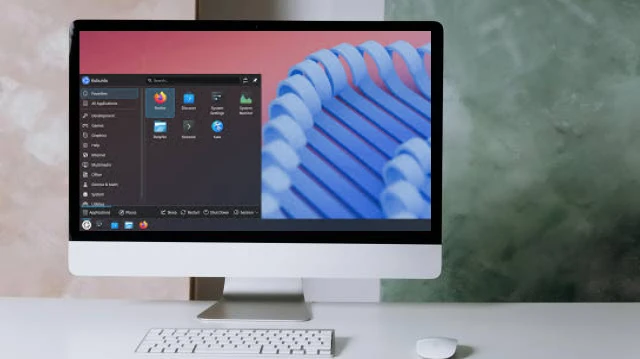
KDE Plasma: The Best Desktop
While Ubuntu uses GNOME, Kubuntu uses KDE Plasma - and KDE Plasma is simply the better desktop environment for most users. (We've covered this in detail in our Desktop Environments article.) It's fast, beautiful, deeply customizable, and immediately familiar to Windows users.
The combination of Ubuntu's rock-solid foundation with KDE Plasma's exceptional desktop is what makes Kubuntu special. You get the most supported Linux ecosystem paired with the best desktop experience.
Ease of Installation
Kubuntu's installer is graphical, friendly, and handles the complicated parts automatically. It detects your hardware, offers sensible default partitioning, and walks you through the process step by step. You can be up and running in 20-30 minutes on typical hardware.
It also supports installing alongside Windows, giving you a dual-boot setup where you choose at startup which OS to use. This is ideal for users who aren't ready to fully commit to Linux.
Long-Term Stability
Kubuntu follows Ubuntu's LTS release schedule. The LTS versions - released every two years and supported for five years - are stable, well-tested, and won't throw unexpected changes at you. You get security updates without drama.
This is the opposite of a rolling-release distribution like Arch, where constant updates mean occasional breakage. For a primary machine you depend on for work, stability matters.
Software Access
Kubuntu has access to Ubuntu's software repositories, which are among the largest and most comprehensive in the Linux world. Need a development tool, a creative application, a server package? It's almost certainly in the repositories, installable with a single command.
The Snap and Flatpak packaging systems also work on Kubuntu, giving you access to applications packaged independently of the distribution - including the latest versions of apps like VS Code, Spotify, and more.
The Short Answer
If you're new to Linux and want a distro that:
- Is easy to install and immediately usable
- Has the best graphical desktop available
- Is backed by one of the largest communities in Linux
- Works with the vast majority of documentation and tutorials you'll find online
- Is stable enough to use as your daily driver
...then Kubuntu is your answer. Download it, install it, and spend a week with it. The learning curve is gentler than you think, and the experience on the other side is worth it.