How to Generate QR Codes in Bulk for Events and Marketing
You're organizing an event with 500 attendees. Each needs a unique QR code for check-in. Or you're a manufacturer labeling 1,000 products with unique tracking codes. Maybe you're a marketer creating personalized QR codes for different store locations.
Creating QR codes one by one is torture. Online generators typically handle one code at a time. Design software requires manual creation for each. And those "bulk QR" services? They charge per code or require subscriptions.
The Bulk QR Problem
Modern marketing and operations need QR codes at scale:
- Event management: Unique codes per attendee for check-in, seat assignment, or access control
- Product labeling: Individual codes for inventory tracking or warranty registration
- Multi-location marketing: Different codes for each store/region to track performance
- Personalized campaigns: Unique codes per customer for attribution
- Asset management: Codes on equipment for maintenance logs
The solutions are either manual (impossible at scale), expensive (per-code pricing), or require technical setup (API integrations, developers).
The Solution: Browser-Based Bulk QR Generation
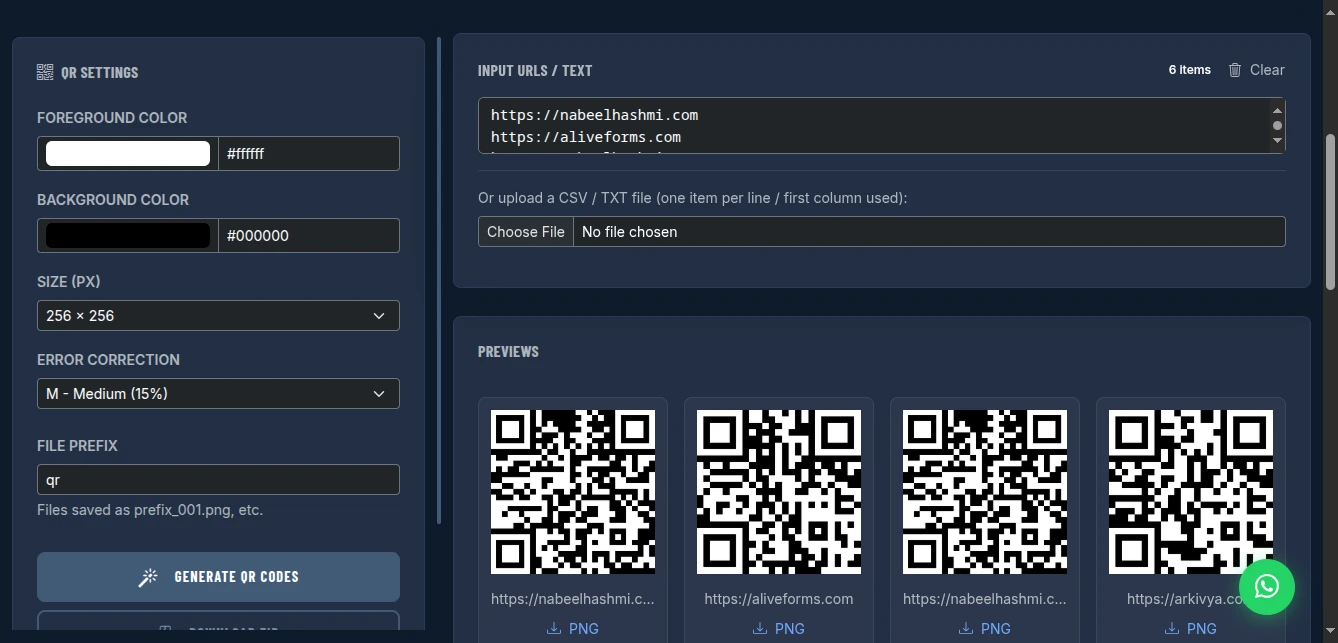
The Bulk QR Code Generator creates one or hundreds of QR codes instantly. Paste your URLs, customize colors and size, and download as individual PNGs or a single ZIP archive. All in your browser-no uploads, no server processing, completely private.
Why This Approach Works
True Bulk Processing: Paste 500 URLs (one per line), get 500 QR codes. No per-code fees. No batch size limits beyond your device's memory.
Custom Styling: Set foreground/background colors to match your brand. Choose from multiple sizes (256px to 1024px). Select error correction levels for damaged-code recovery.
Flexible Input: Type URLs directly, paste from spreadsheet, or upload a CSV/TXT file. The tool reads the first column automatically.
Organized Output: Download as numbered sequence (qr_001.png, qr_002.png) or grab everything as one ZIP file. Ready for printing or digital distribution.
Privacy Protected: Your URLs and data never leave your browser. Generate codes for internal systems, confidential events, or proprietary URLs with complete security.
Key Features for Scale
Flexible Data Input
Three ways to add your URLs/text:
- Direct paste: One per line in the text area
- CSV upload: First column used automatically
- TXT file: One item per line
Pro tip: Prepare your data in Excel first. Column A = QR content, save as CSV, upload.
Visual Customization
- Colors: Custom foreground (typically black/dark) and background (typically white/light)
- Size: 256px to 1024px output
- Error Correction: L (7%), M (15%), Q (25%), H (30%) recovery capability
Error correction explained: Higher levels create denser codes that work even if partially damaged/scratched. Use "H" for outdoor/industrial use, "L" for clean digital display.
Batch Organization
- File prefix: Custom naming (event_qr_001.png, product_001.png)
- Sequential numbering: Automatic 001, 002, 003... formatting
- ZIP packaging: One download for entire batch
No Limits, No Costs
- No quantity cap: Generate 10 or 10,000 codes
- No rate limits: Process at your device's speed
- No fees: Completely free
- No watermarks: Clean, professional codes
How to Use It: Event Scale to Enterprise Scale
Step 1: Prepare Your Data
Create a list where each line becomes one QR code:
https://eventcheckin.com/attendee/001
https://eventcheckin.com/attendee/002
https://eventcheckin.com/attendee/003
...
Or for product SKUs:
SKU-2024-001
SKU-2024-002
SKU-2024-003
...
Step 2: Choose Input Method
For small batches (under 50): Type or paste directly into the text area
For large batches: Save as CSV file (Excel → Save As → CSV), then use "Choose File" upload
Step 3: Customize Appearance
Colors: Enter hex codes or use color picker
- Brand color foreground:
#1a5f7a - Clean white background:
#ffffff
Size: Match your use case:
- Digital only: 256px
- Small print (business cards): 512px
- Large print (posters): 1024px
- Billboards: 1024px+ with high error correction
Error Correction:
- L (Low): 7% recovery, smaller code, use for clean digital
- M (Medium): 15% recovery, balanced, good for print
- Q (Quartile): 25% recovery, durable, use for packaging
- H (High): 30% recovery, most robust, use for harsh environments
Step 4: Set File Naming
Enter a prefix for organized files:
event_qr→ event_qr_001.png, event_qr_002.png...product→ product_001.png, product_002.png...attendee→ attendee_001.png, attendee_002.png...
Step 5: Generate and Download
Click "Generate QR Codes." The tool processes all items locally-progress depends on your device's speed, not internet.
Download options:
- Individual: Click download icon on any QR card
- Bulk: Click "Download ZIP" for all codes in one archive
Real-World Use Cases
Event Management (500 Attendees)
Scenario: Conference check-in with unique QR per attendee
Setup:
- Data:
https://checkin.conference.com/ticket/[001-500] - Size: 512px (works for both digital tickets and printed badges)
- Error correction: M (15%)
- Colors: Conference brand colors
Result: 500 unique QR codes in 2 minutes. ZIP file contains all codes, organized and ready for badge printing or email distribution.
Retail Product Labeling (1,000 SKUs)
Scenario: QR codes on product packaging linking to warranty registration
Setup:
- Data:
https://warranty.brand.com/register?sku=[SKU001-SKU1000] - Size: 256px (small packaging)
- Error correction: Q (25% - survives shipping/handling)
- Colors: Brand black on white
Result: Batch-generated codes imported into label printing software. Each product has unique trackable QR.
Multi-Location Marketing Campaign
Scenario: 50 store locations, each with unique QR to track foot traffic source
Setup:
- Data:
https://promo.brand.com/sale?location=[store001-store050] - Size: 1024px (window posters)
- Error correction: M (15%)
- Colors: Campaign colors
Result: Location-specific tracking without complex URL parameters or developer time.
Asset Management (200 Company Devices)
Scenario: QR codes on laptops/equipment linking to internal wiki pages
Setup:
- Data:
https://internal.company.com/asset/[device001-device200] - Size: 256px (small stickers)
- Error correction: H (30% - survives office wear)
- Colors: Company standard
Result: Maintenance staff scan codes to access device history, manuals, and support docs.
Technical Specifications
QR Version: Automatically calculated based on data length Encoding: UTF-8 support for international characters Format: PNG (lossless, universal compatibility) Transparency: Background color fills entire square, no alpha channel issues
Maximum capacity (varies by content type):
- Numeric only: 7,089 characters
- Alphanumeric: 4,296 characters
- Binary/byte: 2,953 bytes
- Kanji: 1,817 characters
For URLs, typical max is ~100 characters with high error correction, ~200 with low correction.
Privacy and Security
No URL Logging: Your QR destinations are never logged. Generate codes for internal systems, confidential URLs, or proprietary links without exposure.
No Analytics Intermediary: Unlike some QR services that redirect through their servers (tracking scans), these codes go directly to your URL. You control your own analytics.
No Server Processing: Generation happens in your browser. No data transmission. No breach risk.
No Account Required: No email to verify. No password to leak. No database of your QR history.
Pro Tips for Successful QR Campaigns
Test Before Print: Always scan test codes with multiple devices (iPhone, Android, older phones) before mass printing.
URL Shortening: Long URLs create dense, harder-to-scan codes. Use bit.ly or similar for long URLs before QR generation.
Contrast Matters: Dark foreground on light background works best. Avoid yellow on white or dark grey on black.
Quiet Zone: Keep space around QR codes. Don't crowd the edges with design elements.
Call to Action: Add text near the code: "Scan for menu" or "Scan to register." Users need to know why to scan.
Size for Distance: The scanning distance determines minimum size:
- Handheld (business card): 2cm minimum
- Poster (viewed from 1m): 5cm minimum
- Billboard (viewed from 5m): 25cm minimum
Error Correction for Print: Always use at least M (15%) for anything printed. Printing imperfections, folding, and lighting variations reduce scan reliability.
Comparison with Alternatives
| Feature | QR-Code-Monkey | GoQR.me | QR Tiger | This Tool |
|---|---|---|---|---|
| Cost | Freemium | Free | $7+/mo | Free |
| Bulk Generation | Limited | No | Yes | Yes |
| Custom Colors | Yes | No | Yes | Yes |
| Batch Size | 50 max | 1 | 1000+ | Unlimited |
| CSV Upload | Paid | No | Yes | Yes |
| Privacy | Cloud | Cloud | Cloud | Browser-only |
| Watermark | No | No | No | No |
| ZIP Export | Paid | No | Yes | Yes |
Limitations and Workarounds
No Dynamic QR Codes: These are static-URL is encoded permanently. Workaround: Use your own URL shortener (bit.ly) and update the destination there. The QR stays valid, destination changes.
No Logo Embedding: Cannot add brand logo to QR center. Workaround: Generate standard QR, then use design software to overlay logo (ensure error correction is high enough to maintain scan reliability).
No Analytics: Direct QR codes don't track scans. Workaround: Use UTM parameters in URLs (?utm_source=qr&utm_campaign=event) and track in Google Analytics. Or use a URL shortener with analytics.
No Vector Output: PNG only, no SVG/EPS. Workaround: For large format printing, generate at 1024px and upscale in design software, or use high error correction for clean edges.
Conclusion
Stop paying per-code fees. Stop generating QR codes one by one. Stop uploading your proprietary URLs to third-party servers.
The Bulk QR Code Generator handles any scale-from 10 conference badges to 10,000 product labels-with professional customization and complete privacy. Free forever, no limits, no watermarks.
Whether you're organizing events, labeling inventory, or running multi-location campaigns, bulk QR generation should be simple, fast, and private. This tool delivers exactly that.
Generate your QR codes in bulk now - no signup required.