How to Create a WhatsApp Form for Lead Generation Without Coding
You need a contact form for your business. The usual options? Typeform (free tier is limited and branded), Google Forms (sends to spreadsheet, not to you directly), or building a custom form (requires developer, hosting, backend setup). None of them get leads to you instantly where you actually respond-your phone.
WhatsApp is where you actually communicate with customers. It's personal, immediate, and has 2+ billion users. But there's no built-in way to create a form that submits to WhatsApp. You need a custom solution that generates a pre-filled WhatsApp message from form inputs.
The Lead Capture Problem
Traditional forms have friction:
- Typeform: Beautiful but responses go to dashboard, not your phone. You check later, respond later, lose hot leads.
- Google Forms: Collects data in spreadsheet. Manual process to reach out. Impersonal.
- Custom forms: Require hosting, backend, email setup. Maintenance burden.
- Direct WhatsApp link: Just opens chat, no structured data collection.
The ideal solution: A professional form that structures the data collection, then sends it directly to your WhatsApp as a formatted message. Instant notification. Immediate response. Personal touch.
The Solution: Zero-Backend WhatsApp Forms
The WhatsApp Form Maker creates professional, customizable forms that submit directly to your WhatsApp. No server setup. No code. No monthly fees. Build the form, get a shareable link, and receive every submission as a WhatsApp message.
Why This Approach Wins
Instant Notifications: Form submission → WhatsApp message → Your phone buzzes. Respond within minutes while lead is hot.
Zero Infrastructure: No hosting. No database. No backend code. The form encodes data into a WhatsApp URL (wa.me) that opens the app pre-filled.
Professional Presentation: Customizable themes, colors, fonts, and styling. Doesn't look like a Google Form or basic HTML. Matches your brand.
No Middleman: Data goes directly to your WhatsApp. No third-party servers storing customer information. No privacy policy needed for form data.
Free Forever: No submission limits. No "upgrade for more responses." Completely free.
Deploy Anywhere: Shareable link, standalone HTML file, or GitHub Pages hosting.
How It Works (The Technical Magic)
WhatsApp has a feature called "Click to Chat" using wa.me links:
https://wa.me/1234567890?text=Hello%20I%20want%20to%20inquire%20about%20servicesWhen clicked, this opens WhatsApp (web or app) with a pre-filled message to that number.
The WhatsApp Form Maker:
- Collects form data (name, email, service needed, etc.)
- Formats it into a structured message
- Encodes it into a wa.me URL
- Redirects submitter to that URL
- WhatsApp opens with pre-filled message
- They tap send, message arrives in your WhatsApp
No server processing. No data storage. Just clever URL construction.
Key Features for Lead Capture
Form Field Types
- Text: Name, company, subject
- Email: Validated email input
- Phone: Phone number with country code
- Textarea: Multi-line messages, detailed requirements
- Dropdown: Service selection, budget ranges
- Radio: Single choice options
- Checkbox: Multiple selections
- Rating: Star ratings (1-5)
- Date: Date pickers for appointments
Visual Customization
- Background: Solid colors, gradients, or images
- Card Style: Glassmorphism, solid, or outlined
- Colors: Match your brand palette
- Fonts: Selection of professional typefaces
- Border Radius: Sharp or rounded corners
- WhatsApp Badge: Show/hide WhatsApp branding
Form Configuration
- Form Title: Your headline
- Subtitle/Instructions: Context for users
- Logo/Avatar: Brand image at top
- Submit Button: Custom text ("Send via WhatsApp", "Get Quote")
- WhatsApp Number: Where submissions go (include country code)
Field Management
- Drag to reorder: Prioritize important fields
- Required fields: Mark essential information
- Placeholder text: Guide user input
- Field labels: Clear, descriptive titles
How to Use It: Build Your Lead Capture Form
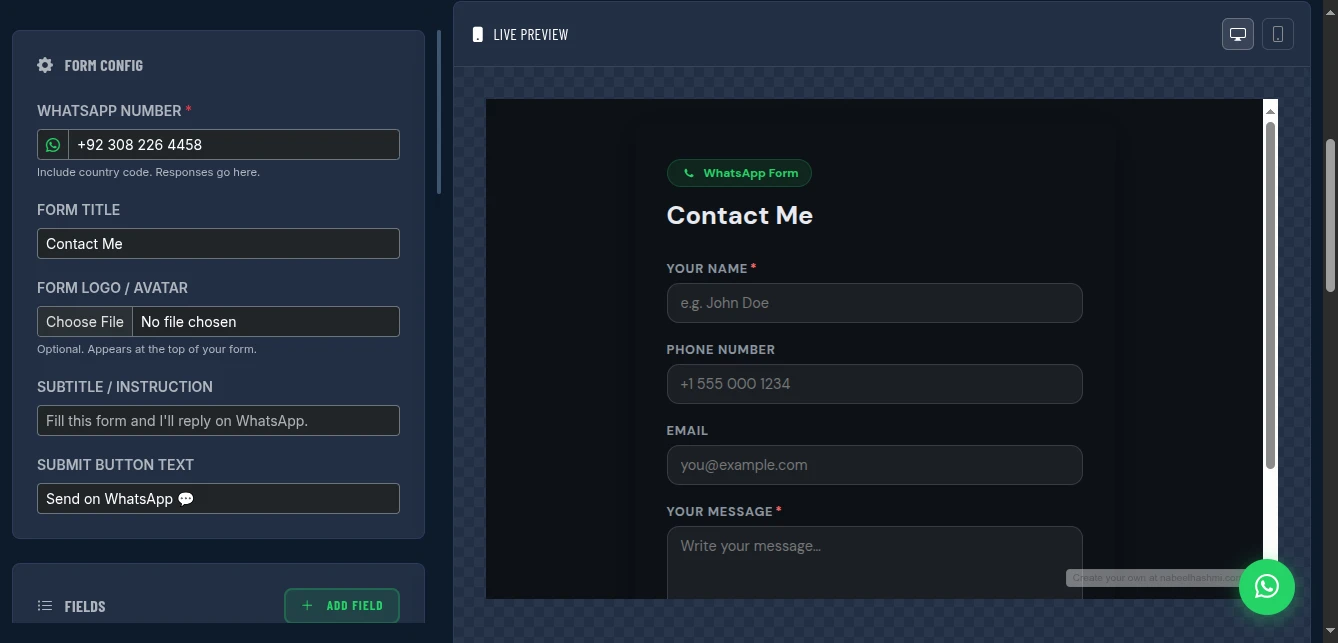
Step 1: Configure Form Basics
Set the foundation:
- WhatsApp Number: Your business number with country code (+1 for US, +44 for UK, +92 for Pakistan, etc.)
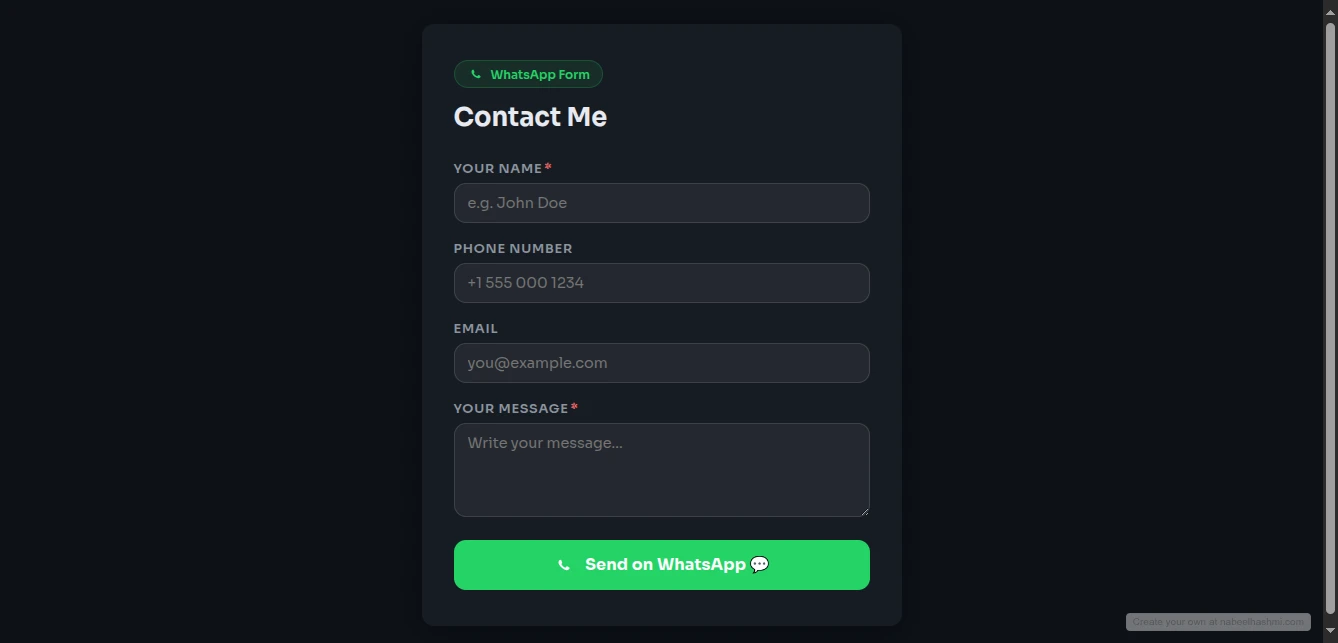
- Form Title: "Get a Free Quote" or "Contact Us" or "Book Appointment"
- Subtitle: Instructions or value proposition ("Fill this form and we'll reply within 2 hours")
- Logo: Upload your business logo (optional)
Pro tip: Use your dedicated business WhatsApp number, not personal. Consider WhatsApp Business app for auto-replies and labels.
Step 2: Add Form Fields
Click "+ Add Field" for each data point you need:
Example lead capture form:
- Name (Text, Required)
- Email (Email, Required)
- Phone (Phone, Optional)
- Service Needed (Dropdown: Website Design, SEO, Content Writing, Other)
- Budget Range (Dropdown: Under $1K, $1K-5K, $5K-10K, $10K+)
- Project Details (Textarea, Required)
- How Urgent? (Radio: ASAP, This Month, Just Exploring)
Field ordering: Put essential fields first. Don't make users scroll for required info.
Step 3: Style Your Form
Make it match your brand:
- Background Type: Gradient (modern), Solid (clean), or Image (branded)
- Card Style: Glassmorphism (trendy), Solid (traditional), Outlined (minimal)
- Primary Color: Your brand color for buttons and accents
- Font: Professional (Inter, Roboto) or distinctive (Playfair, Montserrat)
- Border Radius: 8px (modern) or 0px (sharp)
Pro tip: Match your website's design language. If your site is minimalist, keep the form minimalist.
Step 4: Test the Submission
Before sharing, test thoroughly:
- Fill out the form with test data
- Click submit
- WhatsApp opens (web or app)
- Verify the pre-filled message includes all form data
- Send the message
- Check it arrives formatted correctly in your WhatsApp
Test on multiple devices: iPhone, Android, desktop. Ensure consistent experience.
Step 5: Share or Deploy
Option A: Shareable Link
- Click "Publish & Share Link"
- Copy the generated URL
- Share via:
- Social media bio (Instagram, TikTok, Twitter)
- Email signature
- Business cards (QR code to form)
- Website "Contact" button
- SMS to leads
Option B: Standalone HTML
- Download the HTML file
- Host on your own server
- Embed in iframe on existing site
- Full control, no dependency
Option C: GitHub Pages (Recommended) Deploy for professional URL:
- Create GitHub repository at github.com/new (name it
contact,quote, orbook) - Generate Personal Access Token (Settings → Developer settings → repo scope)
- Enable GitHub Pages (Repo Settings → Pages → Deploy from branch → main)
- Deploy: Paste token and repo in form tool, click Deploy
Your form is now live at: https://yourusername.github.io/contact/
Real-World Use Cases
Freelancer Lead Capture
Scenario: Web developer getting inquiries from Instagram
Form Setup:
- Title: "Get Your Free Website Quote"
- Fields: Name, Email, Business Type, Website Needs (textarea), Budget, Timeline
- Style: Modern gradient matching Instagram aesthetic
Deployment: Link in Instagram bio
Result: 15-20 qualified leads per week via WhatsApp. Respond within minutes during business hours. Conversion rate 40% vs. 10% from email inquiries.
Restaurant Reservations
Scenario: Small restaurant taking bookings via WhatsApp
Form Setup:
- Title: "Book Your Table"
- Fields: Name, Phone, Date, Time, Number of Guests, Special Requests
- Style: Warm colors, food-related background
Deployment: QR code on tables, link on website, printed on receipts
Result: Streamlined booking process. Staff gets instant WhatsApp notification. Reduced no-shows because confirmation is conversational.
E-commerce Support
Scenario: Online store handling order inquiries
Form Setup:
- Title: "Order Support"
- Fields: Order Number, Name, Issue Type (Dropdown: Track Order, Return, Damage, Other), Details
- Style: Professional, matches store branding
Deployment: "Contact Support" button on order confirmation page, email signature, help center
Result: Customers love WhatsApp support speed. Order issues resolved in hours vs. days. Higher customer satisfaction scores.
Event Registration
Scenario: Workshop organizer collecting registrations
Form Setup:
- Title: "Register for Workshop"
- Fields: Name, Email, Phone, Workshop Date (Dropdown), Dietary Requirements, How Did You Hear About Us
- Style: Event-themed colors
Deployment: Event website, social media posts, email campaigns
Result: Instant registration notifications. Easy to follow up with reminders and details via same WhatsApp thread.
Real Estate Inquiries
Scenario: Agent capturing property inquiries
Form Setup:
- Title: "Interested in This Property?"
- Fields: Name, Phone, Budget, Pre-approved? (Yes/No/Working on it), Viewing Preference (Virtual/In-Person), Questions
- Style: Professional, trustworthy colors
Deployment: QR on property flyers, link in listing descriptions, text to leads
Result: Capture interest immediately while they're looking at property. Fast response = more showings = more sales.
Pro Tips for Maximum Conversions
Keep It Short: 4-6 fields optimal. Every additional field reduces completion rate.
Mobile First: Most WhatsApp users are on mobile. Test thumb-friendly button sizes.
Clear Value: Subtitle should state what happens ("We'll reply within 2 hours") and benefit ("Get your custom quote").
Required Fields Only: Mark truly essential fields as required. Optional fields should be truly optional.
Dropdowns for Qualification: Use dropdowns to segment leads (Budget, Service Type, Timeline). Helps you prioritize responses.
WhatsApp Business App: Pair with WhatsApp Business for:
- Auto-replies ("Thanks for your inquiry, we typically respond within 2 hours")
- Labels ("Hot Lead", "Follow Up", "Quote Sent")
- Quick replies (save common responses)
- Business hours (set expectations)
Follow-Up Strategy: When message arrives:
- Acknowledge immediately (even if just "Thanks, reviewing now")
- Respond with substance within promised timeframe
- Keep conversation in WhatsApp (don't force to email unless necessary)
Analytics: Use URL shortener (bit.ly) for your form link to track clicks. Or add UTM parameters if embedding on multiple sites.
Comparison with Alternatives
| Feature | Typeform | Google Forms | Custom Build | This Tool |
|---|---|---|---|---|
| Cost | Freemium | Free | Dev time | Free |
| WhatsApp Integration | No | No | Possible | Native |
| Instant Notifications | Custom | |||
| Customization | Good | Limited | Unlimited | Good |
| No Backend | Yes | Yes | No | Yes |
| Data Storage | Their cloud | Your server | None (direct to WhatsApp) | |
| Privacy | Their policy | Google's | Your control | Maximum (no storage) |
| Mobile Optimized | Yes | Yes | Varies | Yes |
| Shareable Link | Yes | Yes | Varies | Yes |
Limitations and Workarounds
No File Uploads: Can't attach documents (resumes, images). Workaround: Ask for file link (Google Drive, Dropbox) in textarea, or request files in follow-up WhatsApp conversation.
No Conditional Logic: Can't show/hide fields based on answers. Workaround: Create multiple forms for different scenarios, or use dropdowns to capture all variations.
No Auto-Reply: Form doesn't send confirmation to submitter. Workaround: WhatsApp Business app has auto-reply feature. Set up "Thanks for contacting us" auto-reply.
Public WhatsApp Number: Form exposes your number (in the wa.me URL). Workaround: Use dedicated business number. Don't use personal. Consider this is actually a feature-direct line to you.
No Built-in Analytics: Doesn't track submission counts. Workaround: Count WhatsApp messages, or use URL shortener with analytics for click tracking.
Privacy and Security
No Data Intermediary: Form data goes directly from user's device to WhatsApp. No server in between storing information.
WhatsApp Encryption: Messages are end-to-end encrypted. Only you and sender can read them.
No Account Required: Users don't need to create account or log in. Lower friction, higher conversion.
GDPR Consideration: Since you receive data directly, you're data controller. Ensure your privacy policy covers WhatsApp communications. But no third-party form processor to worry about.
Conclusion
Stop losing leads to slow email responses. Stop paying for form builders that don't integrate with how you actually work. Stop building complex backends for simple capture needs.
The WhatsApp Form Maker gives you instant, professional lead capture that fits your workflow. Forms that submit to where you actually respond. Zero infrastructure. Maximum conversion.
Your leads are on WhatsApp. Your form should be too.
Create your WhatsApp form now - no signup required.
?>