How to Audit Your Website SEO Without Expensive Tools
Your website isn't ranking. You know SEO matters, but the tools are expensive-Ahrefs starts at $99/month, SEMrush at $119, Moz at $99. For a small business, side project, or blog, that's prohibitive. You just want to know if your title tags are optimized, your meta descriptions are present, and your headings are structured correctly.
Free SEO checkers exist, but they're limited-checking only one page at a time, or showing vague scores without actionable advice, or requiring email signups that lead to endless sales pitches.
The SEO Audit Problem
Search engine optimization has two sides:
- Off-page SEO: Backlinks, domain authority, social signals (requires expensive tools)
- On-page SEO: Title tags, meta descriptions, headings, schema markup (you can fix this yourself)
Most small sites fail at on-page basics-not because they're complex, but because no one checks. You can't fix what you don't know is broken.
The fundamentals that impact rankings:
- Title tags: 50-60 characters, include target keyword
- Meta descriptions: 150-160 characters, compelling click-through
- Heading structure: One H1, logical H2/H3 hierarchy
- Open Graph: Social sharing optimization
- Schema markup: Structured data for rich snippets
- Canonical URLs: Preventing duplicate content
- Image alt text: Accessibility and image SEO
- Mobile viewport: Responsive design signal
- Robots meta: Controlling crawler access
Checking these manually is tedious. Title tags are in <head>, headings in <body>, Open Graph scattered throughout. You'd spend 30 minutes per page.
The Solution: Instant On-Page SEO Auditor
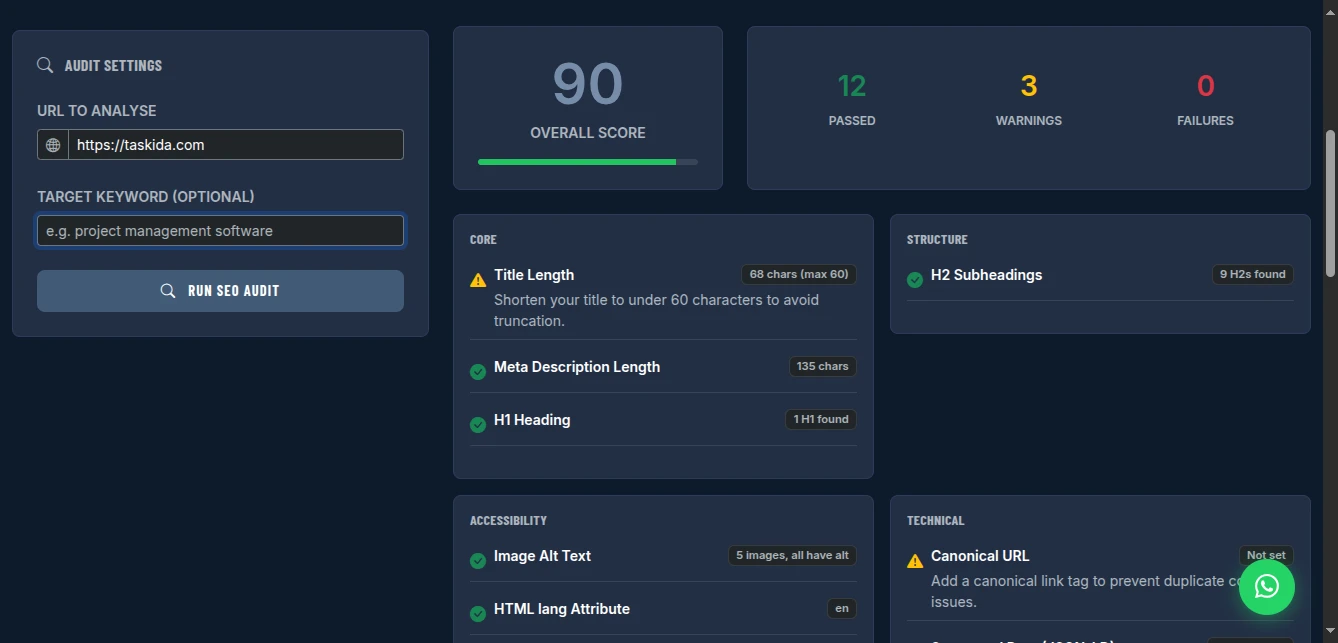
The SEO Analyser audits any page in seconds. Enter a URL, optionally add a target keyword, and get a complete breakdown of on-page SEO signals-with specific pass/warn/fail ratings and actionable fix recommendations.
Why This Approach Works
Comprehensive Coverage: Checks 15+ on-page SEO factors in one scan. Title, description, headings, images, links, schema, social tags, technical setup-all analyzed.
Keyword Context: Enter your target keyword to check if it appears in critical locations (title, H1, meta description, first paragraph). Most free tools skip this.
Actionable Fixes: Not just "your SEO is 72/100." Specific advice: "Title tag is 75 characters-shorten to 60." "Missing H1 tag-add one."
Zero Cost: Ahrefs Site Audit is $99+/month. Screaming Frog is £149/year. This is free, unlimited checks, no registration.
Privacy Respecting: URLs are fetched client-side through a proxy. No server logging your audit history. No email required.
What Gets Checked (And Why It Matters)
Title Tag Analysis
What it checks:
- Presence (missing titles kill rankings)
- Length (50-60 characters optimal for display)
- Keyword presence (target keyword in title)
Why it matters: Title tags are the #1 on-page ranking factor. They're also what users see in search results-your first impression.
Fix guidance: "Title is 75 characters-trim to 60." "Add target keyword near beginning."
Meta Description Audit
What it checks:
- Presence (missing = Google picks random text)
- Length (150-160 characters optimal)
- Keyword presence (helps relevance, not ranking)
Why it matters: Meta descriptions don't directly rank, but they drive click-through rates. Compelling descriptions = more traffic even at same ranking position.
Fix guidance: "Description is 185 characters-shorten to 160." "Add call-to-action like 'Learn more' or 'Get started.'"
Heading Structure
What it checks:
- H1 presence (one per page, critical for topic)
- H1 keyword presence
- H2/H3 hierarchy (logical structure)
- Multiple H1s (confuses search engines)
Why it matters: Headings create content hierarchy. Search engines use them to understand page structure and topic relevance.
Fix guidance: "Missing H1-add main topic heading." "2 H1s found-consolidate to 1." "No H2s-add subtopic sections."
Open Graph Tags
What it checks:
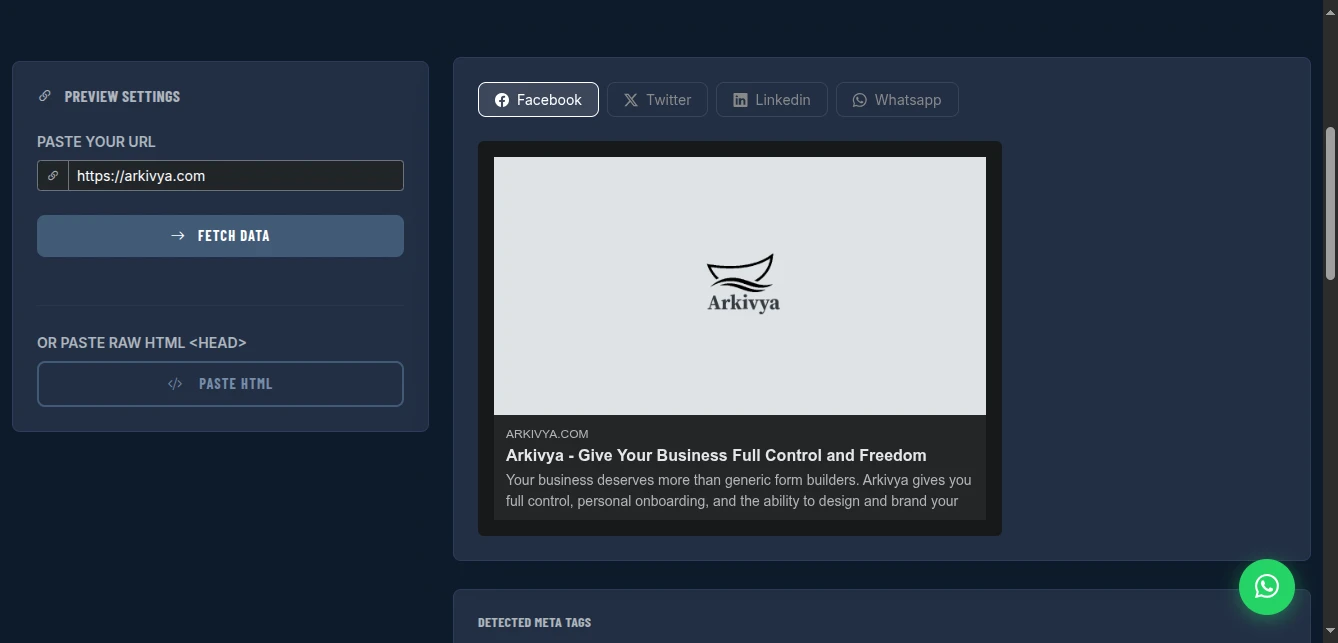
- og:title (social sharing title)
- og:description (social sharing description)
- og:image (social sharing image, min 1200×630)
- og:url (canonical URL for shares)
Why it matters: When your content is shared on Facebook, LinkedIn, WhatsApp, these tags control what appears. No tags = random, often ugly previews.
Fix guidance: "Missing og:image-add 1200×630 image for better social shares." "og:title differs from page title-consider aligning."
Twitter Card Markup
What it checks:
- twitter:card type (summary, summary_large_image)
- twitter:title and description
- twitter:image
Why it matters: Twitter/X uses its own tags. Without them, shares look unprofessional and get fewer engagements.
Schema Markup Detection
What it checks:
- Presence of JSON-LD structured data
- Schema types detected (Article, Product, FAQ, etc.)
Why it matters: Schema enables rich snippets-star ratings, prices, FAQs directly in search results. These dramatically improve click-through rates.
Fix guidance: "No schema detected-add Article schema for blog posts." "Product schema present-verify required properties (price, availability)."
Technical SEO
What it checks:
- Canonical URL (prevents duplicate content penalties)
- Robots meta tag (controls indexing)
- Mobile viewport tag (responsive design signal)
- HTTPS status (ranking factor)
Why it matters: Technical signals tell search engines how to crawl and index your site. Missing viewport tag = not mobile-friendly = ranking penalty.
Image Optimization
What it checks:
- Alt text presence (accessibility + image SEO)
- Images without alt attributes
Why it matters: Alt text describes images to screen readers (accessibility) and helps images rank in Google Images search.
Fix guidance: "12 images missing alt text-add descriptive alt attributes."
How to Use It: Complete Audit Workflow
Step 1: Enter Your URL
Paste the full URL including https://. The tool fetches the page through a proxy and analyzes the HTML.
Note: Pages behind login walls, Cloudflare challenges, or with strict CORS policies can't be fetched. For those, use browser dev tools or check the publicly accessible version.
Step 2: Add Target Keyword (Optional but Recommended)
Enter the primary keyword you're trying to rank for. The tool checks:
- Keyword in title tag
- Keyword in H1
- Keyword in meta description
- Keyword in first paragraph (if accessible)
Example: Auditing a project management software page? Enter "project management software" as the target keyword.
Step 3: Run the Audit
Click "Run SEO Audit." Analysis completes in seconds. Results display as:
- Green check: Pass (optimal or acceptable)
- Yellow warning: Needs attention (not critical, but improvable)
- Red X: Fail (critical issue hurting rankings)
Step 4: Review and Prioritize Fixes
The audit shows issues in priority order:
Critical (Red):
- Missing title tag
- Missing H1
- No canonical URL
- HTTPS errors
Important (Yellow):
- Title too long/short
- Meta description missing
- Missing Open Graph tags
- Images without alt text
Enhancement (Info):
- Schema markup suggestions
- Heading hierarchy improvements
- Keyword optimization opportunities
Step 5: Implement Fixes
Each issue includes specific guidance:
- "Title is 75 characters-reduce to 60"
- "Add meta description: 150-160 characters summarizing page content"
- "Include H1 tag with main topic:
<h1>Your Target Keyword</h1>"
Make changes in your CMS or code, then re-audit to verify fixes.
Real-World Audit Scenarios
Blog Post Optimization
Page: Article about "vegan meal prep" Target keyword: "vegan meal prep ideas"
Audit findings:
- ❌ Title: "Healthy Eating Tips" (missing keyword)
- ❌ No H1 tag
- ⚠️ Meta description too short (90 chars)
- ❌ No Open Graph image
- ✅ HTTPS working
Actions:
- Change title to "15 Vegan Meal Prep Ideas for Busy Weeks"
- Add H1: "Vegan Meal Prep Ideas That Save Time"
- Expand meta description to 155 characters with call-to-action
- Create 1200×630 featured image, add og:image tag
Result: After fixes, page moved from position 23 to 8 for target keyword.
E-commerce Product Page
Page: Product page for wireless headphones Target keyword: "noise cancelling headphones"
Audit findings:
- ✅ Title optimized (includes keyword, 58 chars)
- ⚠️ Meta description present but no price/urgency
- ❌ No Product schema markup
- ❌ 8 product images without alt text
- ⚠️ Missing twitter:image
Actions:
- Add price and "free shipping" to meta description
- Implement Product schema (price, availability, reviews)
- Add descriptive alt text: "Sony WH-1000XM5 noise cancelling headphones in black"
- Add Twitter Card image
Result: Rich snippets appeared in search results (price, rating stars). Click-through rate increased 34%.
Homepage Audit
Page: Agency homepage Target keyword: "web design agency london"
Audit findings:
- ⚠️ Title: "Welcome to Our Agency" (missing keyword)
- ❌ No meta description
- ❌ Multiple H1s (logo and tagline both H1)
- ✅ Open Graph present but generic
- ❌ No LocalBusiness schema
Actions:
- Title: "Web Design Agency London | Custom Websites & Branding"
- Write compelling meta description with services and CTA
- Change logo to div, keep tagline as sole H1
- Add LocalBusiness schema with address, phone, services
Result: Local SEO pack appearance for "web design agency near me" queries.
Pro Tips for SEO Success
Audit Regularly: Check critical pages monthly, full site quarterly. SEO degrades as content changes.
Fix Critical First: Red/X issues hurt rankings immediately. Yellow/warnings are optimization opportunities.
Track Changes: Note audit scores before/after fixes. Correlate with ranking changes in Google Search Console.
Competitive Analysis: Audit competitor pages ranking above you. What are they doing that you're not?
Don't Over-Optimize: Keyword stuffing (repeating keyword unnaturally) triggers penalties. Write for humans, optimize for robots.
Schema Priority: Article/Product/FAQ schemas have highest ROI. Implement these before niche schemas.
Image Alt Text: Describe the image, don't keyword stuff. "Red Nike running shoes on white background" beats "Nike shoes buy now best price Nike shoes."
Comparison with Alternatives
| Feature | Ahrefs | SEMrush | Screaming Frog | This Tool |
|---|---|---|---|---|
| Cost | $99+/mo | $119+/mo | £149/yr | Free |
| On-Page Audit | Yes | Yes | Yes | Yes |
| Keyword Context | Yes | Yes | Limited | Yes |
| Backlink Analysis | Yes | Yes | No | No |
| Rank Tracking | Yes | Yes | No | No |
| Site Crawl | Yes | Yes | Yes | Single page |
| Actionable Fixes | Yes | Yes | Technical | Yes |
| No Account | No | No | No | Yes |
Limitations and Workarounds
Single Page Only: Audits one URL at a time, not full site crawls. Workaround: Audit your most important pages individually (homepage, top 10 content pages, key product pages).
No Backlink Data: Doesn't show who's linking to you. Workaround: Use Google Search Console (free) for basic backlink data, or Ubersuggest (limited free) for more detail.
No Rank Tracking: Doesn't monitor position changes. Workaround: Google Search Console shows average positions. For precise tracking, SERP Robot or AccuRanker (paid).
JavaScript-Rendered Content: SPAs (React/Vue apps) may not fully render for the audit. Workaround: Use "View Source" on your page, paste relevant <head> content into manual check, or use browser dev tools.
CORS/Blocking Issues: Some sites block the fetching proxy. Workaround: Use browser dev tools (Elements tab) to manually inspect tags, or check Google's Rich Results Test for schema.
Conclusion
Stop paying $100+/month to check basic on-page SEO. Stop guessing whether your title tags are optimized. Stop discovering critical SEO issues months after they hurt your rankings.
The SEO Analyser gives you comprehensive on-page audits with specific, actionable fixes-instantly and free. Focus on what you can control (your on-page optimization) while building toward off-page strategies.
SEO isn't magic. It's checking fundamentals, fixing issues, and iterating. This tool makes the fundamentals accessible to everyone.
Audit your website SEO now - no signup required.