How to Build a Linktree Alternative Without Monthly Fees
You need a "link in bio" page. Instagram only allows one link, but you have your portfolio, your shop, your newsletter, your latest YouTube video, your podcast, your TikTok...
Linktree solved this, but now you're paying $9/month for basic customization. And you're promoting Linktree's brand instead of your own. Plus, what if Linktree changes their terms, adds more restrictions, or goes down? Your entire social presence is hostage to their platform.
The Link in Bio Problem
Social platforms limit you to one link. Creators, businesses, and influencers need to direct followers to multiple destinations. The solutions are:
- Linktree: $9-24/month for custom colors and basic analytics
- Carrd: Cheaper but limited free tier, still a third-party platform
- Custom website: Requires coding skills or expensive developers
- Instagram's native links: Limited to business accounts, poor analytics
You're essentially renting your most important digital real estate-the gateway between social discovery and your actual business.
The Solution: Your Own Links Page, Free Forever
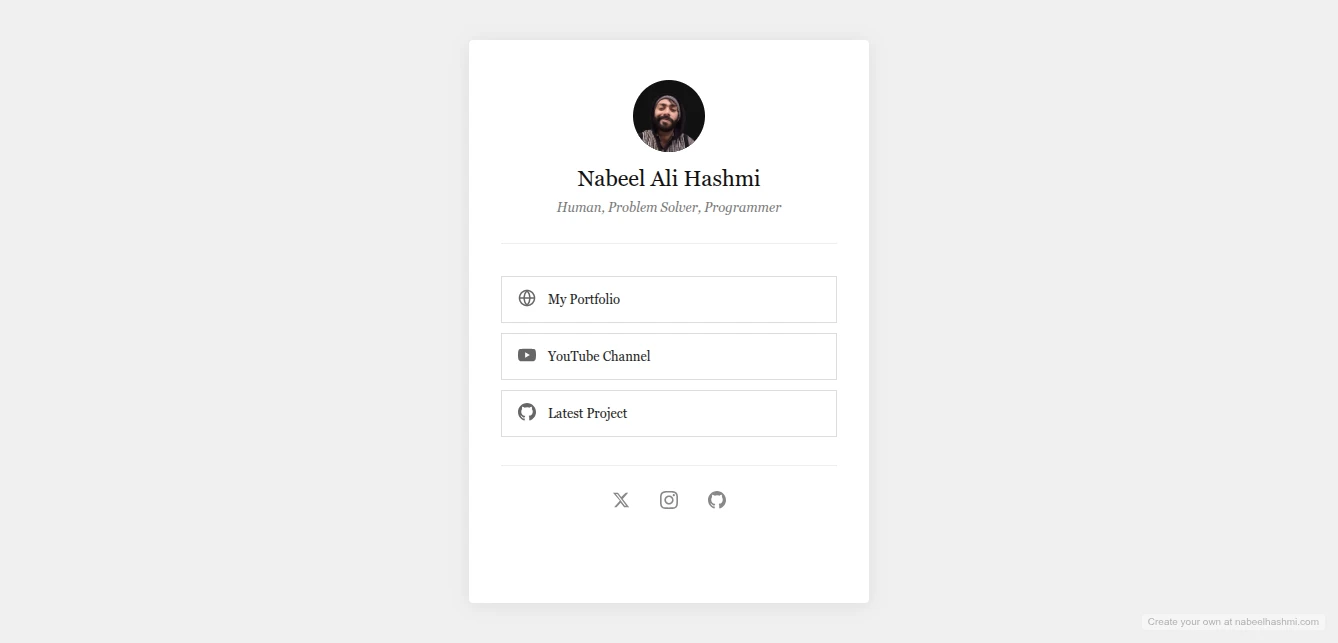
The Links Page Maker creates beautiful, customizable bio link pages that you own and control completely. Multiple stunning themes. Full customization. And deploy to GitHub Pages for free hosting with your own branding.
Why This Beats Linktree
Zero Monthly Cost: Linktree's Pro features (custom colors, analytics, removal of their branding) cost $9/month. This tool gives you all that for free. Forever.
Your Brand, Not Theirs: No "Powered by Linktree" badges. No competing ads. Your page looks like your brand because it is your brand.
Full Control: Want to add a new link? Update anytime. Want to change the design? Do it instantly. No platform restrictions, no feature gates.
GitHub Pages Hosting: Get a professional URL (yourname.github.io/links) with 99.9% uptime, CDN delivery, and SSL-all free. Or use a custom domain if you have one.
Privacy First: No tracking scripts. No data collection. No "we'll sell your analytics to advertisers." Your visitors' data stays private.
Theme Options for Every Brand
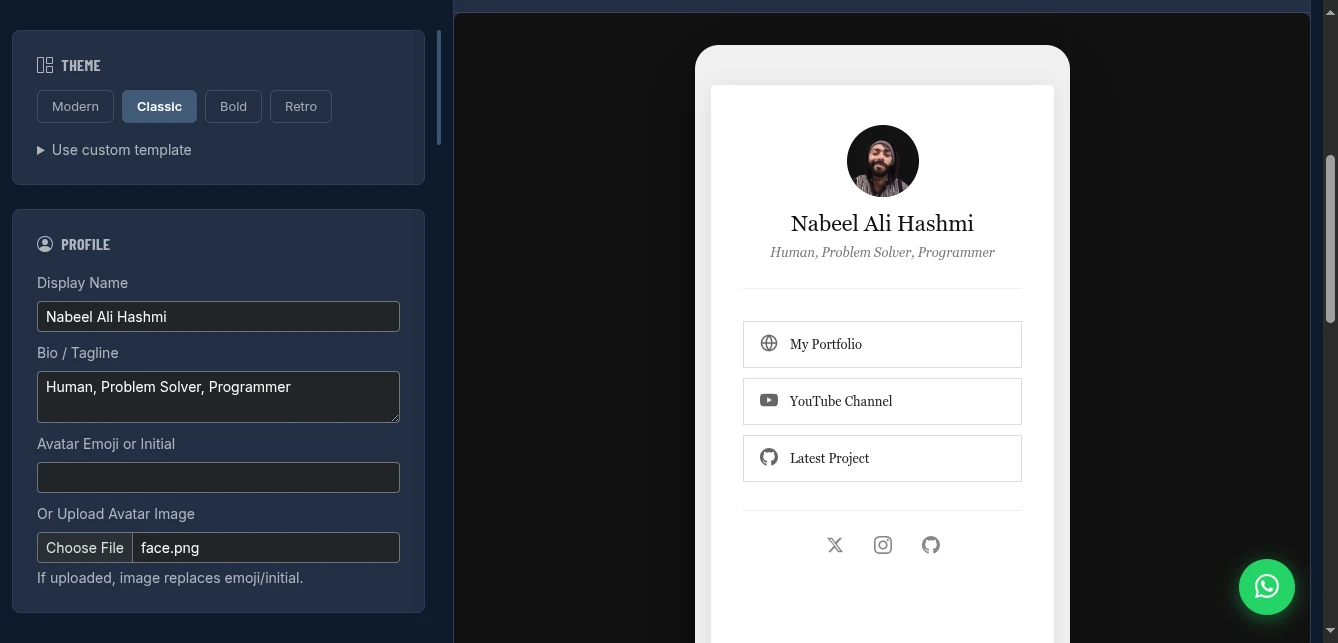
Modern: Gradient backgrounds, glassmorphism effects, contemporary typography. Perfect for creators, influencers, and modern brands.
Classic: Clean, minimal, timeless. Ideal for professionals, consultants, and businesses wanting understated elegance.
Bold: High contrast, strong colors, statement-making. Great for artists, musicians, and bold personalities.
Retro: Vintage aesthetics, unique personality. Perfect for niche communities, throwback brands, and distinctive voices.
Each theme is fully customizable-colors, fonts, spacing, and layout can be tuned to match your exact brand guidelines.
Key Features That Drive Clicks
Visual Customization
- Background: Solid colors, gradients, or upload your own image
- Card Style: Glassmorphism, solid, or outlined buttons
- Typography: Font selection that matches your brand voice
- Avatar: Upload your logo or profile photo
- Animations: Subtle hover effects that invite clicks
Link Management
Add unlimited links with:
- Custom titles and descriptions
- Icon selection (emoji or upload)
- URL targeting (open in new tab)
- Priority ordering (drag to reorder)
Social Integration
Dedicated social icon section for:
- Instagram, Twitter/X, TikTok, YouTube
- LinkedIn, GitHub, Dribbble, Behance
- Custom platforms (add any URL)
Mobile-First Design
Every theme is optimized for the Instagram in-app browser. Fast loading, thumb-friendly buttons, and perfect spacing for mobile screens.
How to Use It: Build in Minutes
Step 1: Choose Your Theme
Select based on your brand personality:
- Creator/Influencer → Modern or Bold
- Professional/Business → Classic
- Unique/Niche → Retro
Step 2: Customize Your Profile
Set your identity:
- Display Name: Your brand or personal name
- Bio/Tagline: One line that describes what you do
- Avatar: Upload logo or photo (replaces emoji if set)
Step 3: Add Your Links
Click "+ Add" for each destination:
- Title: What the link leads to (e.g., "Latest YouTube Video")
- URL: The actual web address
- Icon: Visual cue (emoji or custom upload)
Pro tip: Use action-oriented titles. "Shop New Collection" beats "Store."
Step 4: Add Social Icons
In the social section, add your platform URLs. These appear as icon buttons below your main links.
Step 5: Style to Match Your Brand
Tune the visual settings:
- Background color/image
- Button colors and hover states
- Font selection
- Spacing and padding
- Border radius (sharp vs. rounded)
Step 6: Preview and Deploy
The live preview shows exactly how your page looks on mobile. Once satisfied, deploy to GitHub Pages or download the HTML file.
Deploying to GitHub Pages: Free Professional Hosting
Get your links page online with a clean URL in minutes:
Step 1: Create a GitHub Repository
- Go to github.com/new
- Name it
linksorbioormylinks - Set to Public (required for free Pages hosting)
- Click "Create repository"
Step 2: Generate Access Token
- GitHub Settings → Developer settings
- Classic token: Tick
reposcope - Fine-grained token: Select your repo, set Contents to "Read and write"
- Copy the token (shown only once)
Step 3: Enable GitHub Pages
- In your repo: Settings → Pages
- Source: Deploy from a branch
- Branch:
main, folder:/ (root) - Save
Step 4: Deploy
- In the Links Maker, expand GitHub Deploy panel
- Paste your token
- Repository:
username/links - Click "Deploy to GitHub Pages"
Your page is live at: https://yourusername.github.io/links/
Add this URL to:
- Instagram bio
- TikTok bio
- Twitter/X bio
- Link in email signature
- Business cards
The Economics of Owning Your Links Page
Linktree Pro: $9/month = $108/year = $540 over 5 years This Solution: $0 forever
What You Get for Free:
- Custom colors (Linktree: $9/mo)
- No platform branding (Linktree: $9/mo)
- Analytics via GitHub (Linktree: $9/mo)
- Custom domain support (Linktree: $19/mo)
- Priority links (Linktree: $9/mo)
Total Value: $25+/month equivalent for $0.
Comparison: Linktree vs. Your Own Page
| Feature | Linktree Free | Linktree Pro | This Tool |
|---|---|---|---|
| Monthly Cost | $0 | $9 | $0 |
| Custom Colors | Limited | Yes | Yes |
| Remove Branding | No | Yes | Yes |
| Analytics | Basic | Yes | GitHub |
| Custom Domain | No | $19/mo | Yes |
| Link Count | Unlimited | Unlimited | Unlimited |
| Data Ownership | Linktree | Linktree | You |
| Uptime Control | Linktree | Linktree | GitHub (99.9%) |
| Export/Move | Difficult | Difficult | Easy |
Pro Tips for Maximum Clicks
Link Order: Put your most important/valuable link first. Most clicks go to the top 2-3 links.
Link Titles: Use verbs. "Get the Free Guide" outperforms "Free Guide."
Visual Hierarchy: Use the "Featured" style for your priority link to make it stand out.
Update Regularly: Change your top link based on current campaigns. Driving traffic to a month-old video wastes opportunity.
Analytics: Use UTM parameters on your URLs to track which social platform drives the most traffic: yoursite.com/?utm_source=instagram&utm_medium=bio
Mobile Preview: Always check how your page looks on your actual phone. The Instagram in-app browser has quirks.
Real-World Use Cases
The Instagram Creator: Built a Modern theme page with 8 links-latest video, merch, Patreon, podcast, and social platforms. Deployed to GitHub Pages. Bio link gets 2,000+ clicks monthly. Cost: $0.
The Small Business: Classic theme with links to shop, booking calendar, contact form, and location. Custom colors match brand guidelines. Professional presentation without web developer costs.
The Consultant: Retro theme showcasing personality. Links to Calendly, portfolio PDF, blog, and LinkedIn. GitHub URL in email signature drives 30% of new client inquiries.
The Musician: Bold theme with links to Spotify, tour dates, merch store, and mailing list. Updated weekly with new single releases. Fans always find current content.
Advanced: Using a Custom Domain
Want links.yourdomain.com instead of github.io? GitHub Pages supports custom domains:
- In your repo's Pages settings, add your custom domain
- Configure DNS with your domain provider (CNAME record pointing to
username.github.io) - GitHub automatically provisions SSL certificate
Now your links page has your branded URL, still hosted free on GitHub's infrastructure.
Conclusion
Stop renting your most important digital real estate. Stop paying monthly fees for basic customization. Stop promoting someone else's brand in your bio.
The Links Page Maker gives you a fully customizable, professional bio link page with free GitHub Pages hosting. That's a $9-25/month value for zero cost, with better privacy and full ownership.
Your link in bio is the bridge between social discovery and your business. Own that bridge completely.
>