How to Create Realistic WhatsApp Chat Mockups for Marketing
You need a WhatsApp conversation screenshot for a client presentation. Maybe it's a customer testimonial, a support conversation showing your quick response time, or a viral marketing concept. You could try to stage it on your actual phone, but that's time-consuming and looks staged.
Photoshop? Expensive, and getting the bubble shapes, colors, and fonts exactly right takes hours. Those fake WhatsApp generator apps? They're either covered in ads, add watermarks, or look obviously fake.
Why Fake WhatsApp Screenshots Matter
In modern marketing, social proof sells. A screenshot of a satisfied customer's WhatsApp message is more convincing than a written testimonial. Support teams use mockups for training scenarios. Content creators need them for skits and memes. Developers need them for app store screenshots.
But authenticity is everything. Viewers can spot a poorly-made fake instantly-the wrong green shade, misaligned bubbles, incorrect timestamps. You need pixel-perfect accuracy.
The Solution: Professional WhatsApp Mockup Studio
The WhatsApp Chat Mockup Generator creates indistinguishable WhatsApp screenshots with exact color matching, proper typography, and authentic layout. It runs entirely in your browser-no uploads, no watermarks, completely free.
What Makes It Authentic
Pixel-Perfect Design: Uses the exact WhatsApp color palette, bubble shapes, and spacing. The green "sent" bubbles and white "received" bubbles match WhatsApp's official design system.
Complete Message Types:
- Text messages with proper wrapping
- Image messages with thumbnails
- Voice messages with duration and waveform
- Timestamps that look native
Customizable Details:
- Contact name and photo
- Online/typing status
- Phone time (matches any scenario)
- Check marks (single, double, blue)
Key Benefits Over Other Tools
No Watermarks: Many "free" generators add their logo to your screenshot. This tool is completely unbranded.
Privacy Protected: Your conversation content never leaves your browser. Create sensitive mockups (customer data, internal conversations) with confidence.
Multiple Export Formats: Download as high-resolution PNG for presentations, or as standalone HTML for interactive demos.
GitHub Pages Deployment: Get a shareable link to your mockup with one-click deployment to free GitHub hosting.
How to Use It: Step-by-Step
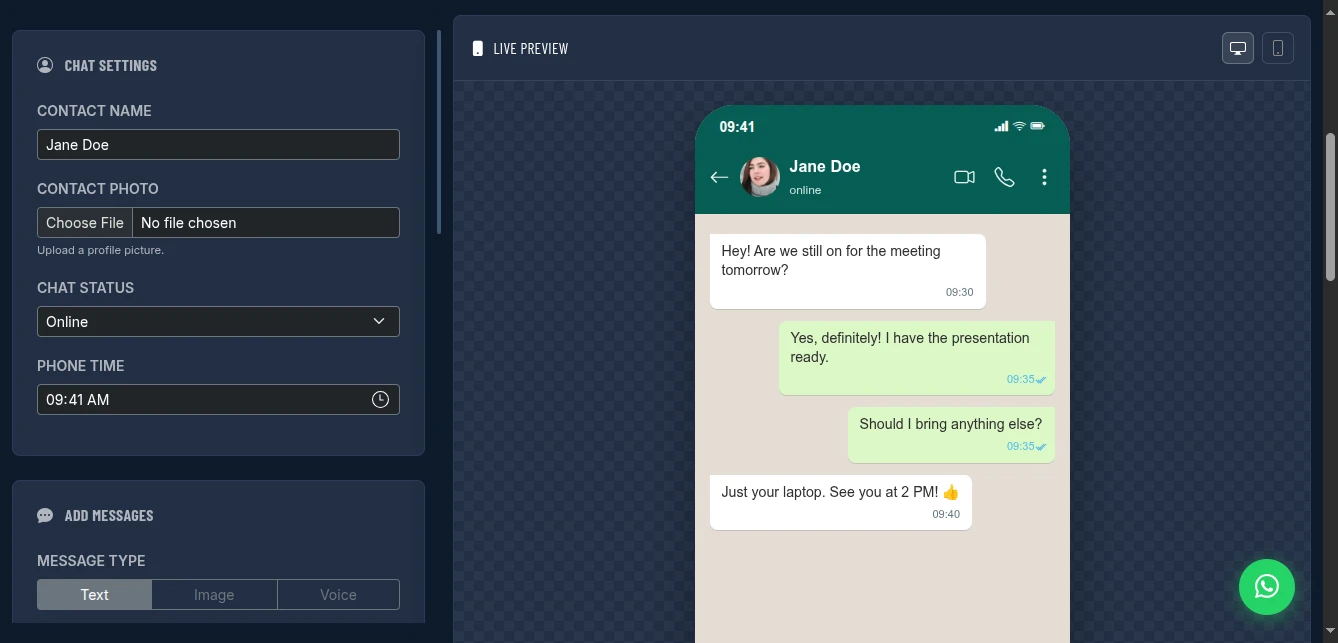
Step 1: Configure Chat Settings
Set the foundation:
- Contact Name: The name appearing at the top
- Contact Photo: Upload any profile picture (optional)
- Chat Status: Online, typing, or last seen
- Phone Time: Set to match your scenario (e.g., business hours)
Step 2: Build Your Conversation
Add messages one by one:
Message Types:
- Text: Standard chat bubbles with proper wrapping
- Image: Upload photos that appear in the conversation
- Voice: Set duration (e.g., [VOICE:12] for 12 seconds)
Sender Toggle: Switch between "Me" (green bubbles, right side) and "Contact" (white bubbles, left side) for each message.
Timestamps: Use %HH:MM% format (e.g., %14:30%) to add realistic timestamps.
Step 3: Arrange and Edit
Messages appear in a sidebar list. You can:
- Click any message to delete it
- Drag to reorder (if needed)
- Use "Clear All" to start fresh
- Add as many messages as needed
Step 4: Customize the Stage
Choose your background:
- Solid colors for clean presentations
- Upload custom images for realistic scenarios
- CSS gradients for branded looks
Step 5: Export Your Mockup
Three export options:
- PNG Screenshot: High-resolution static image
- HTML File: Self-contained, interactive version
- GitHub Pages: Deploy for a permanent shareable link
Why This Matters:
- Free forever: GitHub Pages costs nothing
- Your branding: No third-party ads or watermarks
- Full control: Update anytime by redeploying
- Professional: Share
github.iolinks in presentations
Use Cases That Drive Results
Customer Testimonials: Create realistic screenshots of satisfied customers praising your product. More credible than text quotes.
Support Response Time Proof: Mock up conversations showing 2-minute response times. Use in sales decks.
App Store Screenshots: Create conversation scenarios showing your app's WhatsApp integration.
Training Materials: Build realistic support scenarios for onboarding new team members.
Viral Marketing: Create funny or relatable conversation memes that spread on social media.
Presentation Decks: Add visual variety to pitch decks with chat-based storytelling.
Pro Tips for Authenticity
Timing Matters: Space timestamps realistically. Don't show 5 messages all at 2:00 PM.
Voice Messages: Mix in voice messages for variety. Real conversations aren't 100% text.
Read Receipts: Use double blue check marks sparingly-only when the scenario requires "seen" status.
Contact Photos: Use realistic profile pictures. Generic avatars look fake.
Language Patterns: Match the typing style to the persona. Formal for business, casual for friends, emoji-heavy for younger demographics.
Comparison with Alternatives
| Feature | Mobile Apps | Photoshop | This Tool |
|---|---|---|---|
| Cost | Freemium/Ads | $20/month | Free |
| Watermark | Usually yes | No | No |
| Voice Messages | Rare | Manual | Built-in |
| Privacy | Unknown | Local | Browser-only |
| Speed | Slow | Hours | Minutes |
| GitHub Deploy | No | No | Yes |
Conclusion
Whether you need a customer testimonial screenshot, a training scenario, or a viral meme, the WhatsApp Chat Mockup Generator delivers professional results in minutes. No design skills needed. No expensive software. No privacy concerns.
The pixel-perfect accuracy means your mockups will pass scrutiny even from WhatsApp power users. And with free GitHub Pages deployment, you can share your creations instantly with permanent, professional URLs.