How to Create a Professional Resume Without Microsoft Word
You need a resume. Fast. Maybe you found your dream job posting and the deadline is tonight. Maybe you just got laid off and need to start applying immediately. Or maybe you're just tired of your outdated CV from 2019.
Your options? Microsoft Word (expensive, formatting nightmares), Canva (watermarks on free version, generic templates), or expensive resume builders that lock PDF export behind paywalls. You could hire a designer, but that's $200+ and takes a week.
The Resume Problem No One Talks About
Most resume builders create files that fail ATS (Applicant Tracking Systems)-the software that scans your resume before a human sees it. Fancy graphics, columns, and custom fonts look pretty but get rejected by robots.
Then there's the hosting problem. You want a shareable link for your email signature or LinkedIn, but PDF attachments get buried. Personal websites cost money and require maintenance.
The Solution: ATS-Friendly Resume Builder with Free Hosting
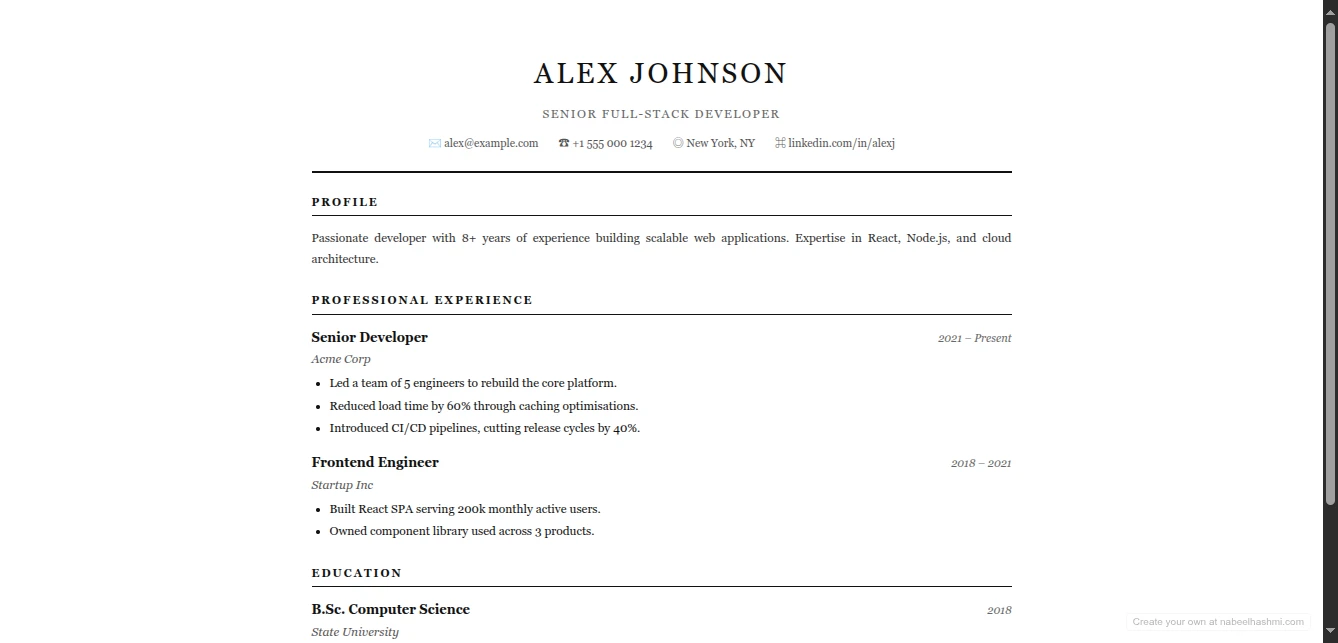
The Resume Maker creates professional, ATS-optimized resumes with multiple stunning templates. Live preview as you type. Print to PDF instantly. And here's the game-changer: one-click publish to GitHub Pages for a free, permanent online resume.
Why This Approach Wins
ATS-Optimized Templates: Clean, single-column designs that parse correctly in applicant tracking systems. No fancy graphics that confuse the bots-just professional typography that gets you to the interview.
Zero Cost, Zero Watermarks: Completely free. No "download PDF" paywall. No branding on your resume. No subscription required.
GitHub Pages Integration: Get your own professional URL (yourname.github.io) with free hosting forever. Update anytime by redeploying. Perfect for modern job searches where employers expect a link, not an attachment.
Privacy First: Your career data stays in your browser. No account required. No data mining. No "we'll email you job opportunities" spam.
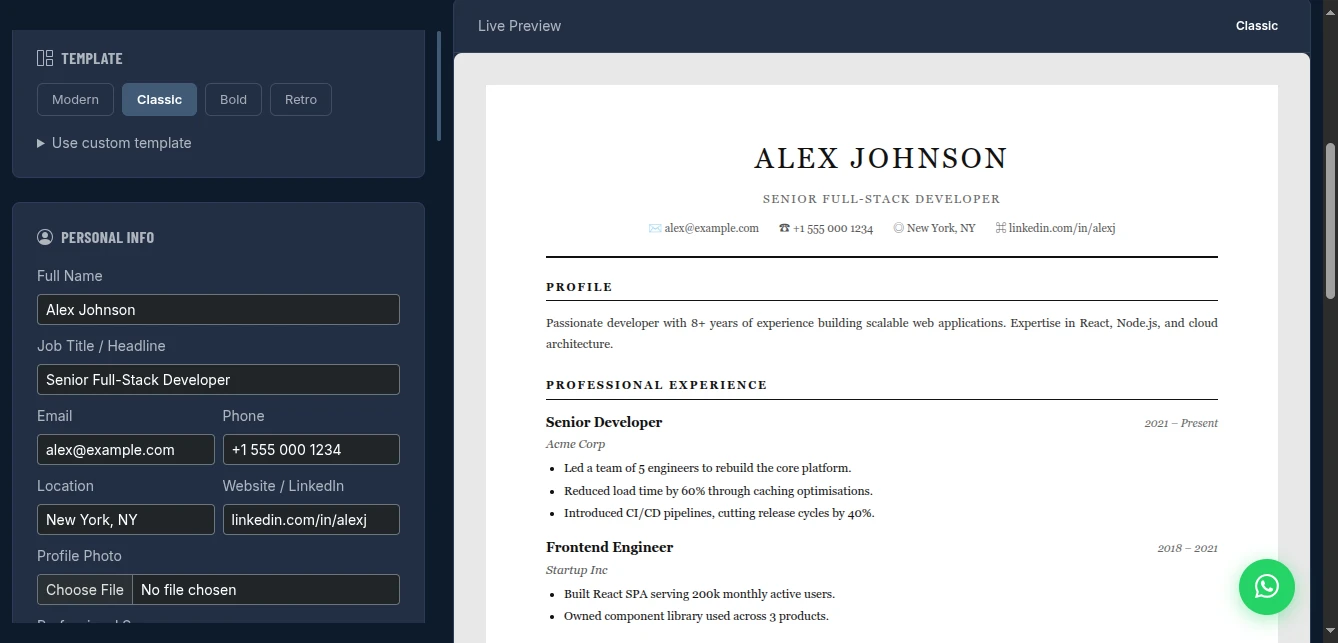
Template Options for Every Industry
Modern: Clean, contemporary design with subtle color accents. Perfect for tech, marketing, and creative roles.
Classic: Traditional, conservative layout. Ideal for finance, law, healthcare, and government positions.
Bold: Strong typography, high contrast. Stands out for design, sales, and executive roles.
Retro: Unique personality for creative industries, startups, and roles where culture fit matters.
All templates are single-column ATS-friendly by default, with optional visual enhancements for when you know a human will read it first.
Key Features That Land Jobs
Live Preview
See exactly how your resume looks as you type. No more "export to PDF, open, spot a typo, repeat" cycles. Every keystroke updates the preview instantly.
Smart Sections
Pre-built, optimized sections:
- Professional Summary (the hook)
- Experience (reverse chronological)
- Education (with GPA option)
- Skills (tag-based, easy scanning)
- Projects (with links)
- Certifications
- Custom sections for your unique background
One-Click PDF Export
Use your browser's print dialog (Ctrl+P / Cmd+P), select "Save as PDF," and get a perfectly formatted resume file. No quality loss, no weird margins.
GitHub Pages Publishing
The killer feature: deploy your resume as a live website in 60 seconds. Here's why this matters:
- Modern job search: Recruiters click links, not attachments
- Always current: Update your resume anytime, the link stays the same
- Professional domain:
github.iois trusted by tech employers - Free forever: GitHub doesn't charge for Pages hosting
- Your control: No platform lock-in, no terms of service changes
How to Use It: From Blank to Hired
Step 1: Choose Your Template
Pick based on your industry:
- Tech/Creative → Modern or Bold
- Conservative fields → Classic
- Standout roles → Retro
Step 2: Fill in Your Details
The form guides you through each section:
- Personal Info: Name, contact, location, LinkedIn
- Summary: 2-3 sentences that sell your value
- Experience: Company, title, dates, bullet points
- Skills: Type and press Enter to create tags
Pro tip: Use action verbs and metrics. "Increased sales by 40%" beats "Responsible for sales."
Step 3: Preview and Refine
Watch the live preview as you edit. Check for:
- One-page length (recruiters scan, they don't read)
- Consistent formatting
- Readable font sizes
- Proper spacing
Step 4: Export or Publish
For PDF applications: Print → Save as PDF For modern applications: Deploy to GitHub Pages
Deploying to GitHub Pages: The Complete Guide
Get your resume online with a professional URL in 4 steps:
Step 1: Create a GitHub Repository
- Go to github.com/new
- Name it
resumeorcvoryourname-resume - Important: Set it to Public (required for free Pages hosting)
- Click "Create repository"
Step 2: Generate a Personal Access Token
- Go to GitHub Settings → Developer settings
- Choose your token type:
- Tokens (classic): Create token, tick
reposcope - Fine-grained tokens: Select your resume repo, set Contents permission to "Read and write"
- Tokens (classic): Create token, tick
- Copy the generated token (it shows only once)
Step 3: Enable GitHub Pages
- In your new repo, click "Settings"
- Scroll to "Pages" in the left sidebar
- Under "Source", select Deploy from a branch
- Select branch:
main, folder:/ (root) - Click Save
Step 4: Deploy from the Resume Maker
- In the Resume Maker, scroll to the GitHub Deploy panel
- Paste your Personal Access Token
- Enter your repository:
username/resume - Branch:
main(default) - Filename:
index.html(default) - Click "Deploy to GitHub Pages"
Your resume is now live at: https://yourusername.github.io/resume/
Share this link in:
- Email signatures
- LinkedIn featured section
- Job application "Website" fields
- Networking conversations
Why GitHub Pages Hosting Is Genius
Cost: $0 forever. No hosting fees. No domain registration. No renewal anxiety.
Reliability: GitHub's infrastructure serves billions of requests. Your resume loads fast, always.
Credibility: Tech-savvy employers recognize GitHub. It signals you're comfortable with modern tools.
Control: Want to update your resume? Make changes in the tool, click Deploy, done. The URL never changes.
No Vendor Lock-in: Your resume is standard HTML. Move it anywhere if you outgrow GitHub.
Comparison with Alternatives
| Feature | Microsoft Word | Canva | This Tool | |
|---|---|---|---|---|
| Cost | $70/year | Freemium | Free | Free |
| ATS Friendly | Sometimes | Rarely | N/A | Yes |
| Online Hosting | No | No | Limited | GitHub Pages |
| Custom Domain | No | No | No | Yes (via GitHub) |
| Privacy | Local | Cloud | LinkedIn owns it | Browser-only |
| PDF Export | Yes | Paywall | Limited | Yes |
Pro Tips for Resume Success
Length: One page for under 10 years experience. Two pages max for senior roles.
Keywords: Mirror the job posting language. If they say "project management," don't write "oversaw initiatives."
Metrics: Numbers beat adjectives. "Managed $500K budget" beats "Managed large budget."
Links: Include your GitHub, portfolio, or LinkedIn. Make them clickable in the online version.
File Names: Save PDFs as FirstName-LastName-Resume.pdf not resume-final-v2-actual.pdf
Update Frequency: Refresh every 3 months, even when not job searching. Capture achievements while fresh.
Real-World Success Scenarios
The Career Changer: Used the Modern template to highlight transferable skills. Deployed to GitHub Pages, included link in LinkedIn headline. Got 3 interviews in 2 weeks.
The Recent Graduate: Used the Classic template, emphasized projects over sparse work history. PDF export for campus recruiting, online version for networking.
The Freelancer: Created a Bold resume showcasing diverse client work. GitHub Pages link in email signature. Clients compliment the professional presentation.
The Tech Worker: Linked GitHub profile, included open source contributions. Recruiters specifically mentioned the clean GitHub Pages URL in outreach.
Conclusion
Stop wrestling with Word formatting. Stop paying for basic PDF export. Stop sending attachments that get lost in inboxes.
The Resume Maker gives you professional, ATS-optimized resumes with free GitHub Pages hosting. That's a combination that costs $100+ elsewhere, available here for free with better privacy protection.
Your resume is your personal brand's landing page. Make it count with a tool designed for how modern job searching actually works.
Build your professional resume now - no signup required.