Tame Your Tabs with ArkTabs
If you're a power user, you probably have dozens of browser tabs open right now. Navigating them with a mouse is slow, and finding the right one can feel like a chore. What if you could manage your tabs as efficiently as you find files on your computer?
Enter ArkTabs, the ultimate tabs manager for Chrome and Edge.
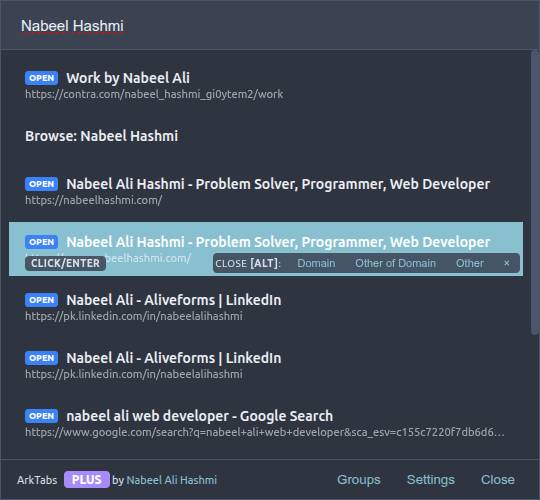
ArkTabs brings a beautiful, Spotlight-like interface to your browser, allowing you to instantly find, manage, and switch to any open tab using fuzzy search.
A Powerhouse of Features
ArkTabs isn't just a search bar; it's a complete tab management toolkit designed for speed and efficiency.
- Instant Fuzzy Search: A Spotlight-like search bar to instantly find any tab. Just start typing, and ArkTabs will intelligently filter your tabs in real-time.
- Real-time Highlighting: Your search term is instantly highlighted within the tab titles in the list view, making it easy to spot exactly what you're looking for.
- Clear List View: All open tabs are displayed in a clean list, showing their titles. The total tab count is always visible, so you know exactly how many you're wrangling.
- Individual Tab Control: Each tab in the list has its own close (X) button for quick and precise cleanup.
- Powerful Bulk Actions: Go beyond one-by-one closing with powerful bulk management tools:
- Close Selected: Hand-pick multiple tabs and close them all at once.
- Close Above/Below: Close all tabs physically located above or below the currently selected tab.
- Close by Domain: Close all tabs that belong to the same domain as the selected tab (e.g., close all
youtube.comtabs).
- Customizable Hotkeys: Open ArkTabs with a custom keyboard shortcut. It defaults to a convenient
Ctrl + Space, but you can change it in the settings to fit your workflow. - Dark Mode Ready: The interface is fully compatible with your system's dark mode for a comfortable viewing experience at any time of day.
- Seamless Integration: ArkTabs integrates smoothly with Chrome and Edge, feeling like a native part of your browser.
Free, with a "Feeling of Ownership"
The core functionality of ArkTabs, with the beautiful Light theme, is completely free to use.
If you want to unlock the Dark and Neon themes, and also get the option to have the ArkTabs popup appear in the center of your screen, you can upgrade to Pro.
The Pro upgrade is a one-time, pay-what-you-want purchase with a minimum of just $0.99. This is a lifetime license. We like to think of this small contribution not as a fee, but as a formality that gives you a "feeling of ownership" over a tool you use every day.
Tutorial: Centering ArkTabs in Tiling Window Managers
For keyboard-driven power users, a tiling window manager is the ultimate setup. By default, most WMs will tile the ArkTabs extension popup, but for the best experience, you want it to float in the center of your screen.
Here’s how to configure it in popular tiling window managers. The key is to create a window rule that targets the specific window title: ArkTabs - Ultimate Spotlight Tabs Manager for Chrome by Nabeel Ali Hashmi.
i3 / Sway
Add the following line to your configuration file (~/.config/i3/config or ~/.config/sway/config):
for_window [title="^ArkTabs - Ultimate Spotlight Tabs Manager for Chrome by Nabeel Ali Hashmi$"] floating enable, move position centerThis rule identifies the ArkTabs window by its exact title, enables floating mode, and moves it to the center of the screen.
dwm
In dwm, you need to edit your config.h file. Add a new rule to the rules array. This will make the window float, but centering may require an additional patch like centeredmaster.
static const Rule rules[] = {
    /* xprop(1):
     *  WM_CLASS(STRING) = instance, class
     *  WM_NAME(STRING) = title
     */
    /* class      instance    title                                                                 tags mask     isfloating   monitor */
    { NULL,       NULL,       "ArkTabs - Ultimate Spotlight Tabs Manager for Chrome by Nabeel Ali Hashmi", 0,            1,           -1 },
    // ... your other rules
};
After editing, you will need to recompile dwm.
Qtile
In your config.py (usually at ~/.config/qtile/config.py), you can add a match to your floating_layout.
import layout
from libqtile.config import Match

floating_layout = layout.Floating(float_rules=[
    # Run the utility of `xprop` to see the wm class and name of an X client.
    *layout.Floating.default_float_rules,
    Match(title='ArkTabs - Ultimate Spotlight Tabs Manager for Chrome by Nabeel Ali Hashmi'),  # Add this line
])
To also center it, you can use a client_new hook:
from libqtile import hook

@hook.subscribe.client_new
def center_arktabs(client):
    if client.name == 'ArkTabs - Ultimate Spotlight Tabs Manager for Chrome by Nabeel Ali Hashmi':
        client.center()
Hyprland
For Hyprland, add these rules to your hyprland.conf:
windowrulev2 = float, title:^(ArkTabs - Ultimate Spotlight Tabs Manager for Chrome by Nabeel Ali Hashmi)$
windowrulev2 = center, title:^(ArkTabs - Ultimate Spotlight Tabs Manager for Chrome by Nabeel Ali Hashmi)$
These rules will make the ArkTabs window float and automatically center it for you.
ArkTabs is more than just a tab manager; it's a workflow enhancement. Give it a try and bring some order to your tab chaos!